How to Humanize an AI Essay the Right Way (Tested on GPTZero)
How to humanize an AI essay responsibly: humanize in Academic tone, fix sentences, edit in your own words and check citations. Our essay scored 100% human on GPTZero.
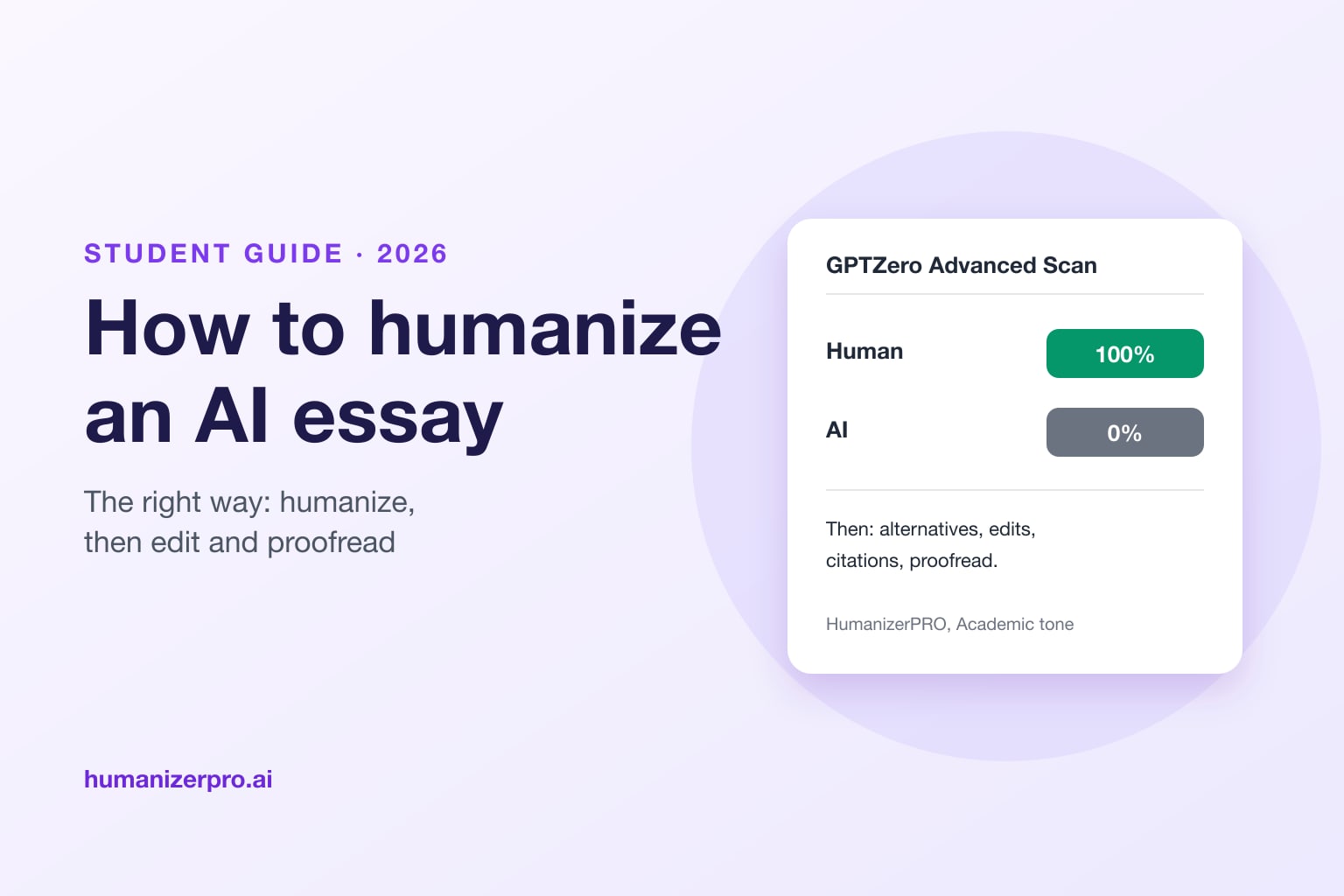
To humanize an AI essay the right way, run it through an AI humanizer in an academic tone, then fix awkward sentences, edit it in your own words, check every citation and claim, and only then check it with an AI detector. Never submit the humanizer's output as it is. In the HumanizerPRO team's September 2026 test, HumanizerPRO's Advanced mode with the Academic tone turned a GPT-4o essay into text that GPTZero's Advanced Scan rated 100% human, and ZeroGPT rated 13.7% AI. Sapling still flagged it as 94.3% AI, and the rewrite had a few sentences that needed fixing, which is exactly why your own edits matter.
Key takeaways
- A humanizer is a first step, not the finished essay. Proofread it, fix sentences and add your own thinking before you submit anything.
- In our test, HumanizerPRO (Advanced mode, Academic tone) kept the essay's structure and its APA citation, and GPTZero's Advanced Scan rated it 100% human.
- Detectors disagreed: ZeroGPT rated it 13.7% AI, but Sapling rated it 94.3% AI. Formal academic writing is harder to humanize.
- Use HumanizerPRO's sentence alternatives to replace lines that don't make sense, and the Edit button to rewrite parts in your own words.
- Follow your school's AI policy. If AI isn't allowed for an assignment, don't use it.
Before you start: using AI for essays responsibly
HumanizerPRO is free to use, and it works on essays too. But we don't think you should paste in an AI essay, press Humanize and hand it in. You didn't write it, and it may contain errors or claims you can't back up.
We know you sometimes use AI: to get past writer's block on a first draft, to structure your research, or because English isn't your first language and you need help putting ideas you already have into words. If you humanize AI content, treat the result as a starting point and proofread every sentence. Make sure it sounds like you, add your own evidence and reasoning, and understand everything you include in your work.
Always check your school's or instructor's AI policy first. Many allow AI for brainstorming or editing but not for writing the essay itself, and some require you to say how you used it. If AI isn't allowed for an assignment, don't use it. If you wrote an essay yourself and a detector flagged it anyway, read what to do if you're falsely accused of using AI.
Why AI essays get flagged
AI detectors look for predictable writing: sentences of similar length, safe word choices, stock transitions ("Furthermore", "Additionally", "In conclusion") and a smooth, even rhythm. Academic essays are especially easy to flag, because formal writing already follows many of those patterns, and AI essays use them heavily. That's why humanizing an essay is harder than humanizing a blog post, and why your own edits make the biggest difference. Learn more in perplexity and burstiness explained.
Our test: humanizing a GPT-4o essay
In September 2026, the HumanizerPRO team asked GPT-4o to write a 313-word, three-paragraph essay for a first-year university course on whether social media harms teenagers' mental health, with one APA citation (Twenge, 2017). Sapling rated the original 97.3% AI.
We pasted it into HumanizerPRO on the live site, chose Advanced mode and the Academic tone, and ran it once. Then we checked the result on three detectors.
| Detector | Original GPT-4o essay | After HumanizerPRO |
|---|---|---|
| GPTZero (Advanced Scan) | Not checked | 0% AI, 100% human |
| ZeroGPT | Not checked | 13.7% AI, "human written" |
| Sapling | 97.3% AI | 94.3% AI |
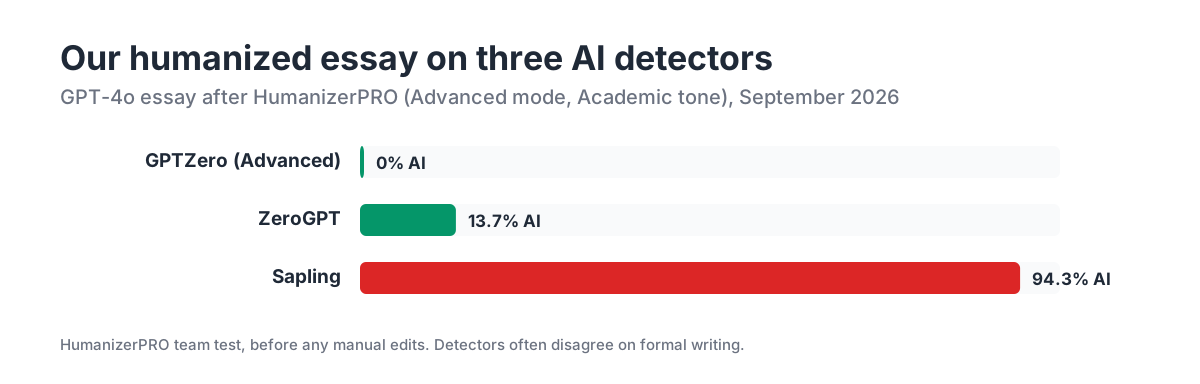
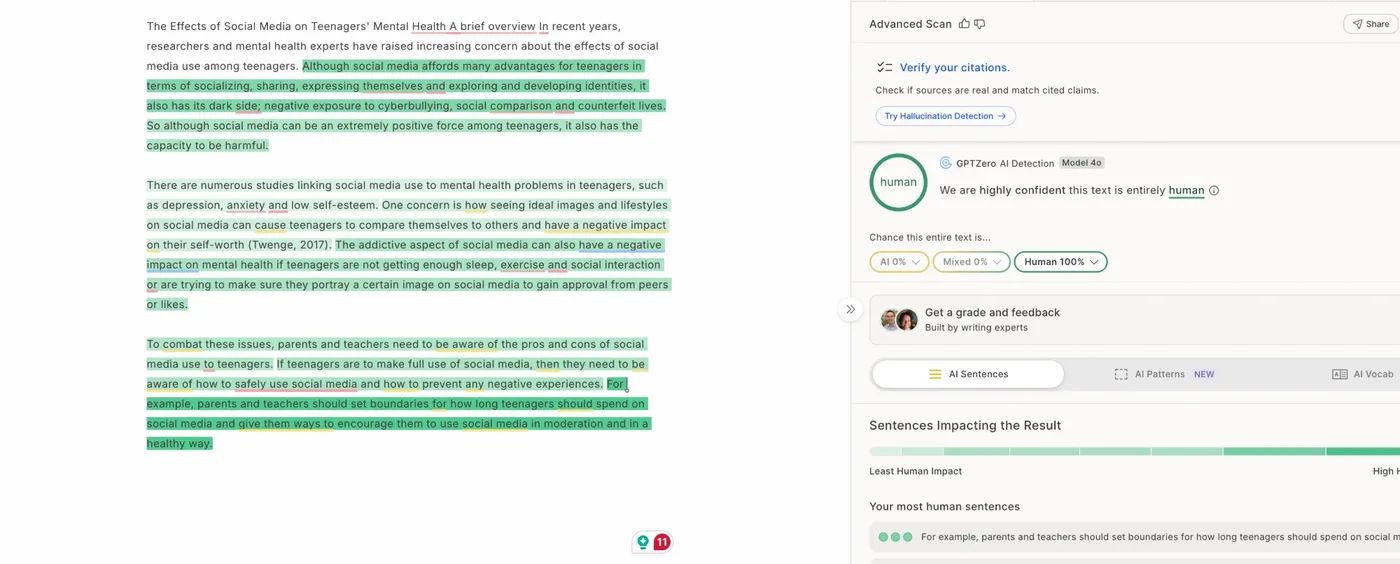
GPTZero's Advanced Scan was "highly confident this text is entirely human", and ZeroGPT called it human-written. Sapling, which is strict on formal writing, still flagged it. Detectors often disagree like this (see are AI detectors accurate?), so a single passing score isn't a guarantee.
What the humanizer got right, and what it didn't
The rewrite kept the essay's three-part structure, its main arguments and the citation "(Twenge, 2017)" in the right place. An AI writing assistant rated its quality 7 out of 10: good, but not finished. A few things needed fixing:
- It added a title and glued it to the first sentence: "The Effects of Social Media on Teenagers' Mental Health A brief overview In recent years...".
- It used an odd phrase, "counterfeit lives", for unrealistic portrayals of life.
- It made a claim stronger than the original: "Research indicates" became "There are numerous studies", which your sources may not support.
None of these are hard to fix, but you have to read the essay to catch them. That's what the next steps are for.
How to humanize an AI essay, step by step
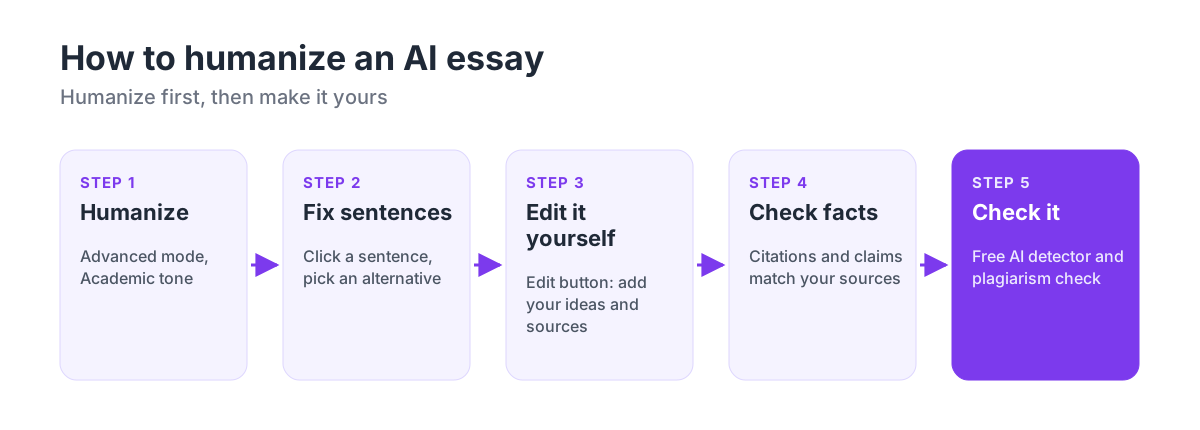
- Start from your own ideas. Know what you want to argue before you touch a humanizer. If the draft came from AI, make sure you agree with it and can explain every point.
- Humanize in Academic tone. Paste the essay into HumanizerPRO, choose Advanced mode and the Academic tone, and click Humanize. You can do up to 500 words without an account, so humanize longer essays a section at a time.
- Fix sentences with alternatives. Read the output sentence by sentence. When a sentence doesn't make sense or doesn't sound like you, click it: HumanizerPRO shows several alternative versions. Pick the best one, or choose "Write Custom Version" to type your own.
- Edit in your own words. Click the Edit button (the pencil icon above the output) to edit the whole text directly. Remove anything the humanizer added, such as an extra title, and add your own analysis, examples and course readings. After editing, click any sentence that still feels off and use the alternatives again. Repeat until the essay reads like you.
- Check citations and claims. Make sure every citation is still in the right place and that no claim became stronger than your sources support. Our AI fact-checking guide shows how to check claims quickly, and HumanizerPRO's free fact checker can help.
- Fix grammar. Click the Fix grammar button to clean up spelling and grammar slips in one click, then read the result once more.
- Check it. Run the final essay through HumanizerPRO's free AI detector and plagiarism checker. If a paragraph is flagged, rewrite it yourself rather than humanizing it again and again.
Try it free: Humanize your essay draft with HumanizerPRO in Academic tone, then use sentence alternatives and the Edit button to make it your own. No sign-up for your first 500 words.
Tips for better essay results
- Humanize prose, not quotes. Leave direct quotations, formulas and technical terms exactly as they are.
- Keep your citation style. Check that APA, MLA or Chicago citations and your reference list weren't changed.
- Read it aloud. Awkward phrases like "counterfeit lives" are much easier to hear than to see.
- Add something only you know. A class discussion, a reading from your course or your own example makes the essay yours, and it's the change detectors can't predict.
- Don't over-humanize. Running the same text through a humanizer many times makes it less accurate, not more human.
- Try an essay-specific tool. EssayCheck, our sister site, has a free essay humanizer alongside an AI checker and essay grader, with no account needed.
For general tips that apply to any kind of text, see our guide on how to humanize AI text.
Frequently asked questions
Can I humanize an AI essay for free?
Yes. You can humanize up to 500 words without an account, with Advanced mode and the Academic tone free. If your essay is longer, split it into sections and humanize one at a time. Before you use the output, always proofread and revise it yourself.
Will a humanized essay pass AI detectors?
It can, but not every detector every time. In our test, GPTZero's Advanced Scan rated our humanized essay 100% human and ZeroGPT rated it 13.7% AI, but Sapling still rated it 94.3% AI. Your own edits and additions are what make an essay reliably yours.
Will a humanized essay pass Turnitin?
We couldn't test Turnitin, because it's only available through schools. Since August 2025, Turnitin also flags text it thinks was changed by AI humanizers. Read how to humanize AI text for Turnitin for practical advice, and check your school's AI policy.
Is it cheating to humanize an AI essay?
It depends on your school's rules. Some schools allow AI for brainstorming or editing, but not for writing the essay itself. If you hand in an AI essay you haven't read, edited and understood, it isn't your essay, even if it's humanized. If AI isn't allowed, don't use it.
Does humanizing change my citations?
It shouldn't, and in our test HumanizerPRO left the reference "(Twenge, 2017)" in place. However, a rewrite can change how strongly a claim is stated, so review each cited sentence against your source before you submit.
Which tone should I use for an essay?
Choose the Academic tone for essays, reports and research papers. Then use sentence alternatives and the Edit button to adjust anything that sounds too formal or doesn't sound like you.

Kamran Khan
Kamran Khan is the founder of HumanizerPRO and a leading voice in the ethical use of AI-generated content. With years of hands-on experience in AI, SEO, and digital publishing, he built HumanizerPRO to help creators and professionals turn robotic AI text into clear, human-like writing that meets real-world standards.