How to Humanize AI Text for Turnitin: 10 Techniques That Actually Work (2026)
How to humanize AI text so it reads as human and holds up to Turnitin: 10 techniques, a step-by-step workflow, our 0% Turnitin test, and the rules to follow.
To humanize AI text so it holds up against Turnitin, you need to change the patterns Turnitin measures, not just the words: vary sentence length, remove predictable phrasing, add your own specifics, and rewrite with a real humanizer rather than a paraphraser. Then check the result with an AI detector before you submit. In the HumanizerPRO team's August 2025 test, a text humanized this way came back 0% AI on Turnitin. Just as important, follow your course's rules on AI. If you're working on an essay, also see how to humanize an AI essay the right way.
Key takeaways
- Turnitin looks at predictability and rhythm, and since August 2025 it also flags text rewritten by paraphrasers and humanizers.
- Synonym-swapping doesn't work. What works is changing sentence structure and adding specifics only you know.
- A good humanizer plus your own edits is the most reliable combination. In our test, HumanizerPRO took a text from 50% to 0% AI on Turnitin.
- If your course bans AI, humanizing doesn't make it allowed. These techniques are for AI-assisted work that's permitted, and for protecting your own writing from false flags.
First, a word on rules
This guide is for two groups: writers whose own work keeps getting flagged as AI, fairly or not, and people who are allowed to use AI for school, work or clients but want the finished piece to sound more natural. If your school or client prohibits AI-generated work, disguising it to avoid detection is still a violation. When in doubt, check with your instructor or client, and disclose AI use where their guidelines require it.
How Turnitin spots AI writing
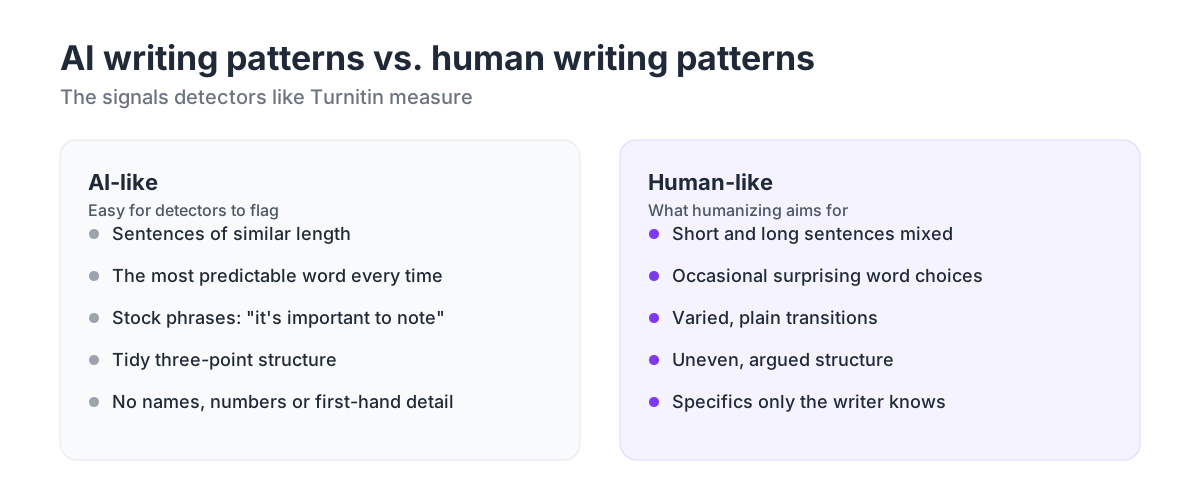
Turnitin's detector is trained to recognize the statistical fingerprint of language-model text. It breaks your paper into segments and scores each one. Three things raise the score:
- Predictable word choice. Language models tend to pick the most likely next word, so their text has low "perplexity."
- Even rhythm. AI sentences cluster around the same length and structure, so the text has low "burstiness."
- Paraphrasing fingerprints. Since August 2025, Turnitin also flags AI text that was reworded by paraphrasing or humanizing tools.
We explain perplexity and burstiness in detail in how AI detectors actually work, and how Turnitin reports scores in our Turnitin AI checker guide.
10 techniques to humanize AI text
1. Start from your own outline
The most human text begins with human thought. Write your outline, argument and examples before you open an AI tool, then have AI draft within that structure. A draft built on your own ideas needs far less humanizing than one built on a generic prompt.
2. Rewrite with a real humanizer, not a paraphraser
Paraphrasers like QuillBot swap words but keep each sentence's skeleton, which is exactly what Turnitin now looks for. A humanizer rebuilds sentences, rhythm and structure. We compare the two in AI humanizers vs. paraphrasing tools.
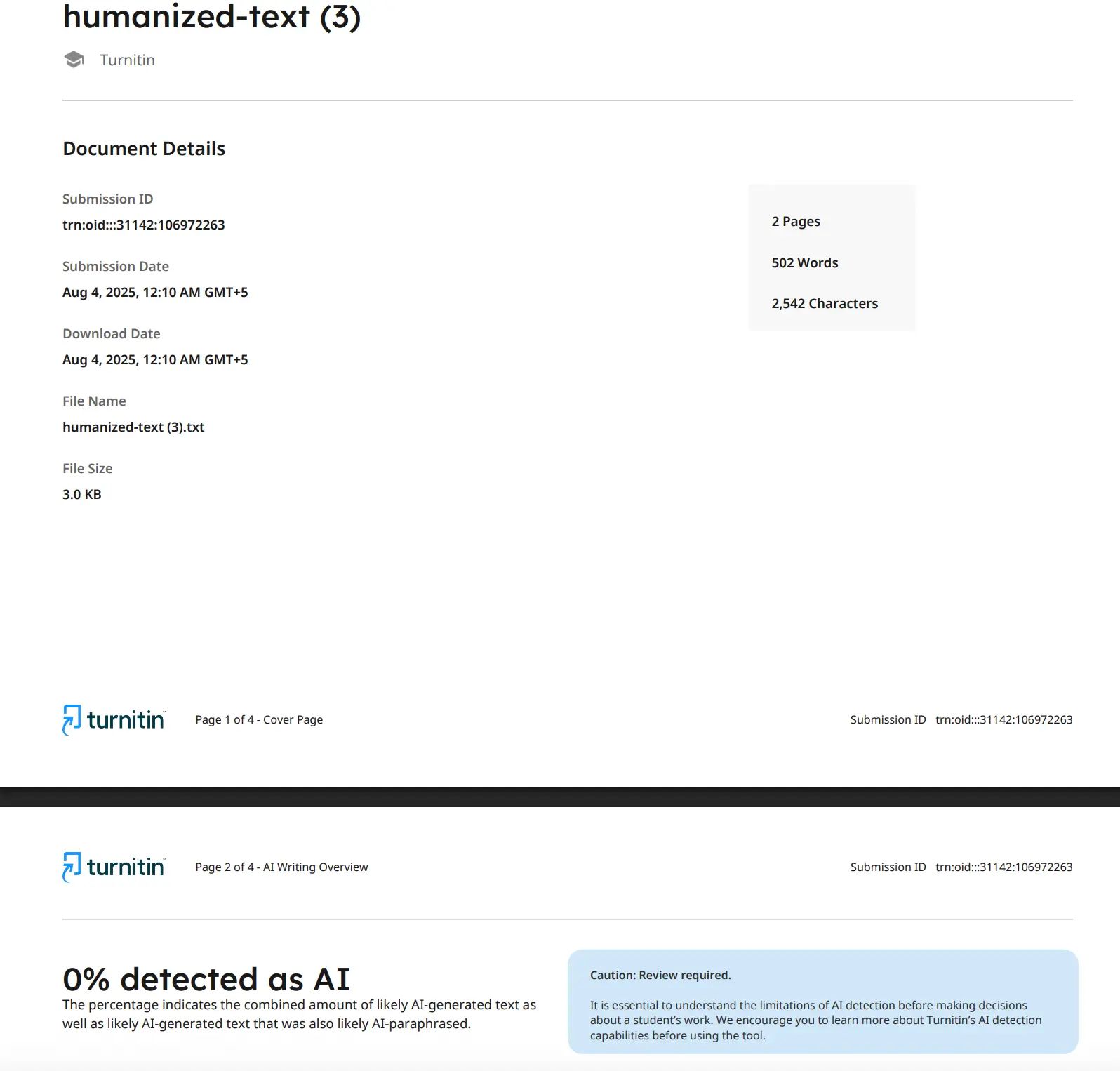
In the HumanizerPRO team's August 2025 test, a 502-word text that Turnitin had flagged as 50% AI was humanized with HumanizerPRO and came back 0% AI, including Turnitin's AI-paraphrase category.
3. Vary your sentence length
AI prose tends to amble along in sentences of 15 to 25 words. Human writing goes all over the place. Write a short sentence, then a long one. A fragment, if it fits. That simple change helps burstiness more than anything else.
AI-like: "Remote work offers many benefits. It improves work-life balance. It also reduces commuting time. Many companies are adopting it."
Human-like: "Remote work gave me back two hours a day. That's the commute, gone, and it changed how I plan everything from breakfast to deep work, which is why I'd find it hard to go back."
4. Add specifics only you know
Detectors can't flag details a model couldn't have generated: your actual case study, a result from your own research, what happened in your lab class or at your job. Specifics make the writing better, too.
5. Cut stock AI phrases
Some phrases are strong AI tells: "in today's fast-paced world," "it's important to note," "plays a crucial role," "delve into," "a testament to," "navigating the complexities." Delete them or say the plain thing instead. We list more in how to tell if text is AI-generated.
6. Use contractions and plain words
Unless your assignment requires formal register, write the way you'd explain it to a classmate. "Don't" instead of "do not," "use" instead of "utilize," "help" instead of "facilitate."
| AI-like | Human-like |
|---|---|
| It is important to note that | Note that |
| In order to | To |
| Utilize | Use |
| Do not forget | Don't forget |
| Plays a crucial role in | Matters for |
7. Break the perfect structure
AI likes lists of three. It loves symmetrical paragraphs. And it likes to end by repeating the introduction. Let some paragraphs run longer, join related points, and finish on a thought rather than a restatement of what you've already written.
8. Put your opinion in
Models hedge. People take positions. Say what you think and why, then acknowledge the other side. An argued opinion is both more human and more convincing.
9. Read it out loud
Anything that sounds like a brochure when you say it out loud will read like AI. Take those sentences and put them in your own words.
10. Check before you submit
Run the final version through an AI detector to see which sentences still look machine-written, and through a plagiarism checker in case a rewrite accidentally echoes a source. HumanizerPRO's free AI detector scores text sentence by sentence, and its plagiarism checker and fact checker are free too.
A step-by-step workflow
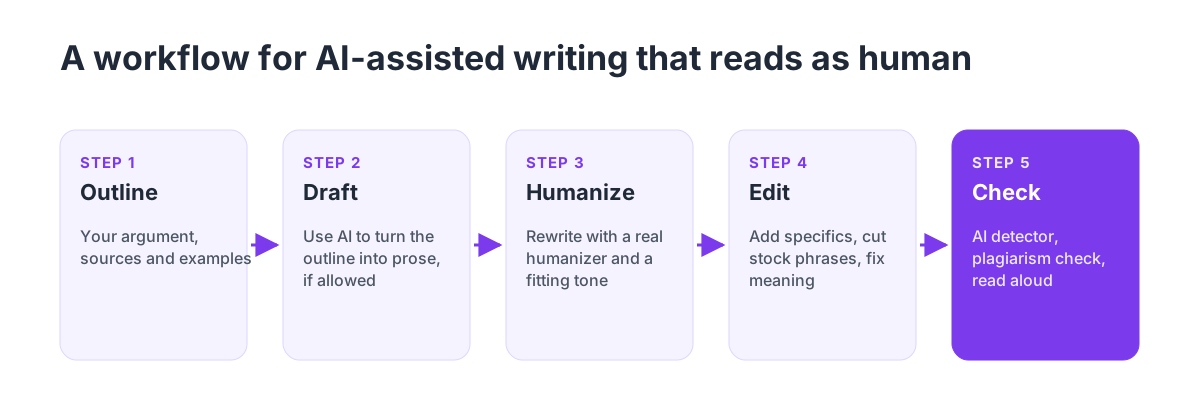
- Outline: your argument, sources and examples.
- Draft: use AI to help turn the outline into prose, if your course allows it.
- Humanize: rewrite the draft with a humanizer such as HumanizerPRO, choosing a tone that fits, like academic.
- Edit: add your specifics, cut stock phrases, fix anything that changed your meaning.
- Check: AI detector, plagiarism checker and a final read-aloud.
Mistakes that get text flagged
- Only using a paraphraser. Turnitin's bypasser detection is built to catch it.
- Humanizing without reading the result. Humanizers can occasionally change meaning or introduce odd phrasing.
- Leaving AI citations unchecked. Models invent sources. A fake reference is worse than a high AI score.
- Pasting everything at once. Writing inside Google Docs or Turnitin Clarity leaves a draft history that shows your process. A single giant paste doesn't.
- Relying on one detector. Different detectors disagree, so a pass on one doesn't guarantee a pass on Turnitin.
If your own writing gets flagged
False positives still happen, often to non-native English writers and to writing that's formal or formulaic. A widely cited Stanford study found that detectors misidentified 61% of essays by non-native English writers as AI-generated. If Turnitin flags your original work, be ready with your drafts and version history, explain your process to your instructor, and request a manual review. We break down the process in our Turnitin AI checker guide.
Tools that help
- HumanizerPRO: humanizer with academic and other tones, plus a free AI detector, plagiarism checker and fact checker.
- A citation manager: Zotero or your library's tool, to make sure every source is real.
- Google Docs version history: your best evidence if you're ever questioned.
For a ranked comparison of humanizers, including how each did against Turnitin, GPTZero and Originality.ai, see our list of the best AI humanizers.
Frequently asked questions
Can Turnitin detect humanized AI text?
It tries to. Since August 2025, Turnitin flags AI text that was reworded by paraphrasers or humanizers, and shallow tools are easy for it to catch. Deeper humanizing can pass: in our August 2025 test, a text humanized with HumanizerPRO scored 0% AI on Turnitin.
What is the best way to humanize AI text for Turnitin?
Combine a real humanizer with your own edits: vary sentence length, cut stock phrases, add specifics only you know, and check the result with an AI detector before submitting. HumanizerPRO does the rewrite and the checking in one place.
Does paraphrasing with QuillBot bypass Turnitin?
Not typically. Paraphrasers keep the sentence structure that Turnitin analyzes, and Turnitin now flags AI-paraphrased text directly. In our tests, QuillBot's humanizer output still scored 96% AI on Originality.ai.
Is it cheating to humanize AI text?
It depends on your program's or class's rules. Humanizing AI-assisted work that's permitted, or protecting your own writing from false flags, is legitimate. Passing off AI-generated work as your own where AI is restricted remains a violation, whether or not a tool was involved.
How can I check my text before submitting to Turnitin?
You can't run Turnitin on your own, but a free AI detector gives you a decent indication. HumanizerPRO's detector highlights the sentences that look AI-generated so you can fix them.

Kamran Khan
Kamran Khan is the founder of HumanizerPRO and a leading voice in the ethical use of AI-generated content. With years of hands-on experience in AI, SEO, and digital publishing, he built HumanizerPRO to help creators and professionals turn robotic AI text into clear, human-like writing that meets real-world standards.