What Is AI Humanization? How It Works, When It Helps, and Its Limits
AI humanization rewrites AI-generated text so it reads like a person wrote it. Learn how humanizers work, how detectors respond, and when humanizing helps.
AI humanization is the process of rewriting AI-generated text so it reads like a person wrote it. A humanizer changes sentence rhythm, word choice and structure while keeping the meaning, which removes the flat, predictable patterns that make ChatGPT output easy to spot for readers and for AI detectors.
Key takeaways
- Humanizing is a rewrite of how something is said, not what is said. Facts, claims and structure should survive it.
- AI text gets noticed because it is too even: similar sentence lengths, safe word choices and stock phrases. Detectors measure the same things.
- Good humanizers rewrite paragraph by paragraph and check the meaning afterwards. Bad ones swap synonyms and break the text.
- Humanizing can't fix wrong facts, and it doesn't change the rules of your school or client. Use it to make honest work read better.
What is AI humanization?
When you ask ChatGPT, Gemini or Claude to write something, what you get is clean, coherent and slightly flat. Every paragraph is more or less the same length. Transitions such as "Moreover" and "In conclusion" dutifully appear right on schedule. The word choice is conservative. Nothing in it is exactly wrong. But readers pick up on it, and so does software.
AI humanization takes that draft and rewrites it to sound like a particular person wrote it on a particular day. It varies sentence length, trades bland phrasing for plain, concrete wording, breaks up the tidy structure, and gets rid of the stock connecting phrases AI is so fond of. The result keeps all the information in the draft but loses the statistical fingerprint of the model behind it.
Humanization can be done by hand, and that's exactly what a good editor does. An AI humanizer does it in seconds, using a language model trained to write in a human register rather than the default "helpful assistant" voice.
Why AI text reads like AI
It helps to know what you're fixing. Most AI-written drafts share the same handful of habits:
- Even rhythm. Sentences cluster around 15 to 25 words. Humans swing between four-word sentences and forty-word ones.
- Predictable word choice. A model picks the most likely next word most of the time, so the text rarely surprises you.
- Stock phrases. "In today's fast-paced world", "it's important to note", "plays a crucial role", "delve into". These are verbal tics of models, not of people.
- Over-structured layout. Three bullet points, a bolded summary, a neat conclusion that repeats the introduction.
- No specifics. No names, numbers, dates or first-hand details, because the model doesn't have any.
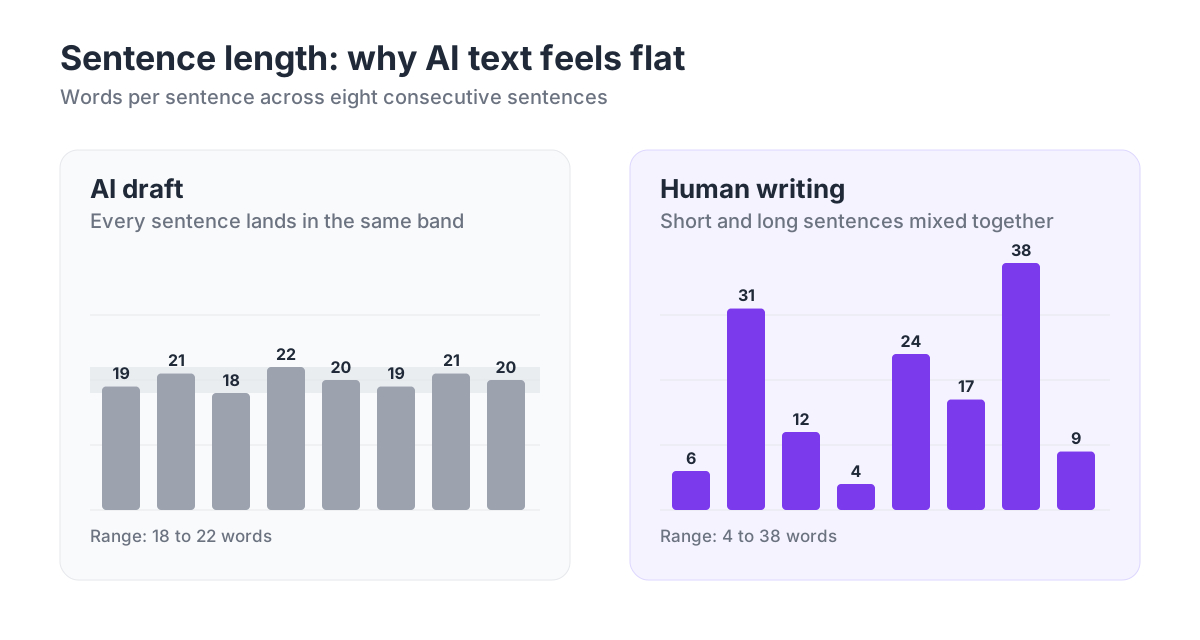
Detectors measure the same habits. The two classic signals are perplexity, which is how predictable each word is, and burstiness, which is how much that predictability varies from sentence to sentence. We explain both, with examples, in how AI detectors actually work.
How AI humanizers work
A modern humanizer is a language model doing a different job. It takes finished text and rewrites it under one instruction: keep the meaning, change the voice. The good ones are fine-tuned on a large body of human writing, so their default style reads more like a person's blog post, email or essay than a chatbot's answer.
Here is roughly what happens when you paste text into a humanizer like HumanizerPRO:
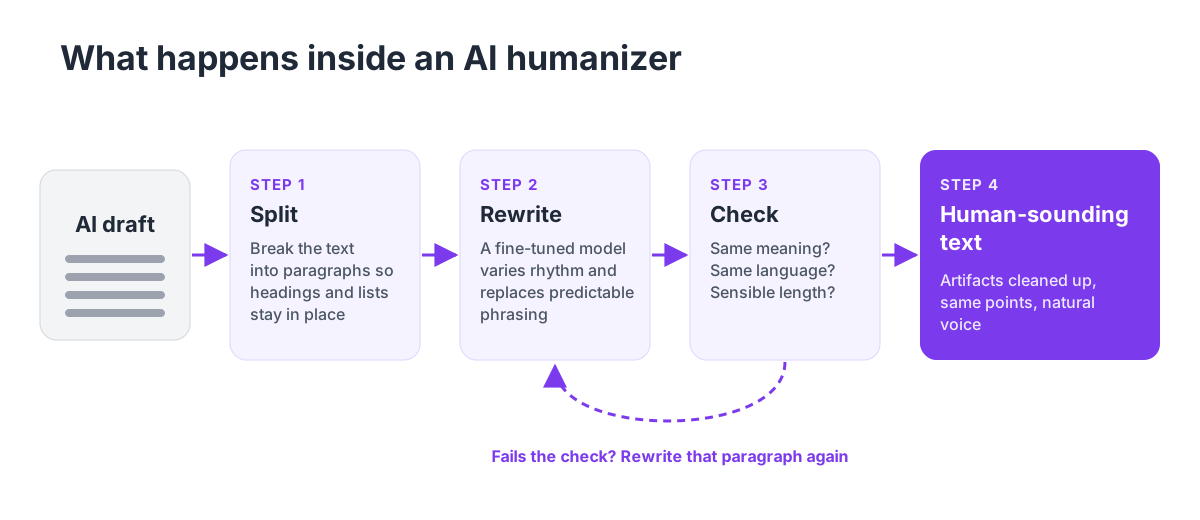
- Split. Long text is broken into paragraphs, so each rewrite stays focused and headings and lists keep their place.
- Rewrite. A fine-tuned model rewrites each paragraph, varying sentence length and replacing predictable phrasing. Some tools first adjust the tone, for example academic, casual or blog.
- Check. The output is compared with the input. If a paragraph comes back in the wrong language, far too short or far too long, it is rewritten again or handled by a backup model.
- Clean. Leftover artifacts, such as stray markdown or a model repeating its instructions, are stripped before you see the result.
Cheap "humanizers" skip most of these steps. They run a synonym swap over the text, which is why their output is stuffed with words like "commence" instead of "start", and why it still gets flagged.
Humanizing vs. paraphrasing vs. editing
These three get mixed up, and they solve different problems.
| AI humanizer | Paraphrasing tool | Human editor | |
|---|---|---|---|
| Main goal | Make AI text read as human-written | Say the same thing in different words | Improve clarity, accuracy and voice |
| What changes | Rhythm, word choice, structure | Mostly words and phrases | Anything that needs it |
| Keeps meaning | Yes, when done well | Usually | Yes |
| Adds facts or examples | No | No | Yes |
| Speed | Seconds | Seconds | Hours |
| Best for | AI drafts that sound robotic | Rewording a sentence or source | Work that has to be right |
Paraphrasers such as QuillBot are designed to rephrase text, not to change its statistical profile, which is why paraphrased AI text usually still gets flagged. We put both types of tool side by side in AI humanizers vs. paraphrasing tools. And nothing beats an editor who knows the subject.
How AI detectors respond
Detection has come a long way from basic perplexity scores. GPTZero, Originality.ai and Turnitin now use classifiers trained on huge datasets of human and AI samples, and they examine the entire document for patterns rather than calculating odds word by word.
Turnitin added AI bypasser detection in August 2025 to catch text that was created by AI and then put through a humanizer or paraphraser. It's one of the reasons basic synonym-swapping tools no longer work. Turnitin's own figures show how common AI writing already was: roughly 11% of the more than 200 million submissions its detector analyzed in its first year contained 20% or more AI-written content. Find out how its scoring works in our Turnitin AI checker guide.
Watermarking is the other approach people often ask about. Google's SynthID can add a hidden statistical watermark to text generated by Gemini, but the catch is that only Google's tools can detect it. Standard AI detectors can't read it. OpenAI built a watermark for ChatGPT but chose not to release it, not least because a simple rewrite by another AI model can remove it. As it stands, any detector you'll run into judges writing style, not a hidden marker.
Detectors make mistakes, too. An often-quoted Stanford study found that popular detectors labeled 61% of essays by non-native English writers as AI-written, because their simpler vocabulary looked "predictable". Humanization is partly a response to that problem.
Check before you submit. Paste your text into our free AI detector to see which sentences look machine-written, then humanize only the parts that need it.
When AI humanization helps
Done properly, humanizing is an editing step (see how to humanize AI text for the full workflow, or our list of the best free AI to human text converters), and it's most useful when:
- You write with AI and publish under your name. Blog posts, newsletters and product pages drafted with AI read better once the model's tics are gone. Readers stay longer on text that sounds like a person.
- English is your second language. If your own writing gets flagged because it is simple and careful, a humanizer can add the variation that detectors expect from native writing.
- You need the same message in a different voice. Turning a formal report into a friendly email, or a dry product spec into a landing page.
- Your drafts all sound the same. Teams that use AI for first drafts often end up with a house style nobody chose. Humanizing breaks the pattern.
Where it falls short
Humanizers reword text. They don't know whether what you typed is true. If the original AI draft made up a statistic or a quote, the humanized version will contain the same fake statistic or quote wrapped in nicer words. Run anything factual through a fact checker and vet your sources.
They also can't guarantee that text will pass as human on every detector, every single time. Detectors change constantly, and any tool promising text that's completely undetectable, now and forever, is overselling.
Rules matter too. Many schools and clients have policies on AI use, and humanizing text doesn't change what those policies allow. If a class bans AI-written work, a humanizer doesn't make it allowed. If AI is allowed with disclosure, disclose it.
How to humanize AI text well
Here's what we suggest, whatever tool you use:
- Start with a better draft. Give the AI your outline, your examples and your opinion. A generic prompt produces generic text that no rewrite can rescue.
- Add what only you know. Numbers from your own work, a real example, a sentence that says what you actually think. This is the part detectors and readers both reward.
- Run it through a humanizer. Rewrite paragraph by paragraph, and pick a tone that matches where the text is going.
- Read the output out loud. Fix anything that changed your meaning or sounds off. A humanizer is a fast first editor, not the last one.
- Check it. Run the final version through an AI detector and a plagiarism checker before you publish or submit.
Which AI humanizer should you use?
Full disclosure: we build HumanizerPRO, so we're biased. The honest short version: HumanizerPRO rewrites paragraph by paragraph using fine-tuned models, works in eight languages and several tones, and comes with the detector, plagiarism checker and fact checker mentioned above. You can try it free, with no signup needed.
If all you need is a free humanizer without a signup, try our sister tool, SuperHumanizer. It handles up to 1,200 words per request, offers a fast "Super Lite" mode and a more thorough "Super Ultra" rewrite, and is available as a Chrome extension and as Android and iOS apps.
For more options, including tools we don't make, see our roundup of the best AI humanizers.
Frequently asked questions
What does it mean to humanize AI text?
It means rephrasing text that an AI model produced so it sounds like a human wrote it. The meaning stays the same, but the cadence, structure and word choice shift to break up the patterns typical of machine-written text.
Is using an AI humanizer cheating?
It depends on the rules you're working under, not on the tool. Humanizing your own AI-assisted blog post or email is ordinary editing. Using it to hide AI use in a class or job that bans AI breaks that rule, just as it would without the tool.
Can AI detectors detect humanized text?
Sometimes. Well-humanized text gets past most detectors most of the time, but detectors keep advancing, and Turnitin now specifically checks for text that has been run through a bypass tool. No humanizer can truthfully promise a 0% AI score on every detector.
Does humanized AI content rank on Google?
Google has said it rewards useful content no matter how it was produced, as we explain in does Google penalize AI content?. Humanizing makes a page easier to read, but it won't make the page rank on its own without real expertise and a good answer to the question.
Is there a free AI humanizer?
Yes. HumanizerPRO lets you humanize up to 500 words without an account and up to 1,000 words a month with a free account, and the AI detector, plagiarism checker and fact checker have free tiers too.

Kamran Khan
Kamran Khan is the founder of HumanizerPRO and a leading voice in the ethical use of AI-generated content. With years of hands-on experience in AI, SEO, and digital publishing, he built HumanizerPRO to help creators and professionals turn robotic AI text into clear, human-like writing that meets real-world standards.