Claude Humanizer Skill Review (2026): We Tested It on GPTZero
We tested the Claude Humanizer skill (blader/humanizer): clean edits, but GPTZero still said 100% AI. SuperHumanizer scored 100% human on the same scan.
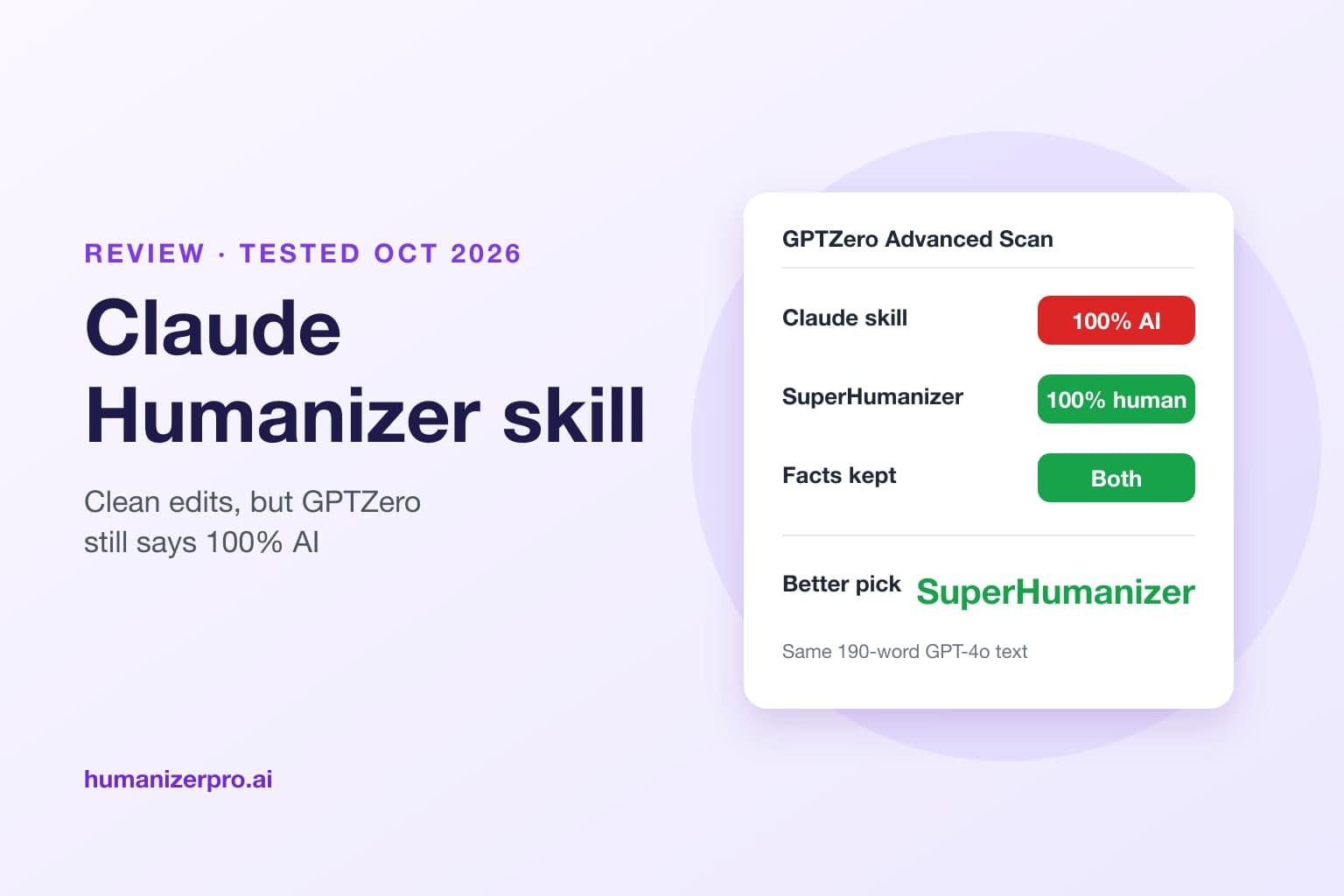
The Humanizer skill for Claude is a free, open-source add-on that helps Claude rewrite AI text so it doesn't show the usual signs of AI writing, using Wikipedia's "Signs of AI writing" guide. It's a decent style editor, but it's not made to beat AI detectors, and even its GitHub page admits that. In HumanizerPRO's October 2026 test, we ran our usual 190-word GPT-4o text through the skill in Claude Code: the output read cleanly and kept every fact, but GPTZero's Advanced Scan still called it 100% AI. When the same text went through SuperHumanizer, a free AI humanizer, and was checked with its Proofread button, it got a 100% human score on the same scan. If you need text that reads as human to AI detectors, use SuperHumanizer instead of the Claude skill.
Key takeaways
- The Humanizer skill (blader/humanizer on GitHub) is free and open source, works in Claude Code, Claude.ai, Codex and other AI agents, and has about 57,000 GitHub stars.
- It removes 26 patterns of AI writing, from "not X but Y" contrasts to em dashes and words like "pivotal" and "robust".
- Its README says: "Getting past AI detectors is not a goal, and detectors still flag most of its output."
- In our test, GPTZero's Advanced Scan rated the skill's rewrite 100% AI.
- SuperHumanizer's rewrite, after a second pass and its free Proofread check, scored 100% human on the same GPTZero scan.
- Use the skill to clean up your own drafts. Use SuperHumanizer when the text has to read as human to a detector.
Claude Humanizer skill vs SuperHumanizer at a glance
| Humanizer skill for Claude | SuperHumanizer | |
|---|---|---|
| What it is | Instructions that tell Claude how to edit text | A dedicated AI humanizer with its own fine-tuned models |
| Price | Free (needs a Claude, Codex or other AI agent account) | Free, no sign-up |
| Words per run | Limited by your AI plan | Up to 1,200 |
| Built to pass AI detectors | No, by its own description | Yes |
| GPTZero Advanced Scan, our test | 100% AI | 100% human, after Proofread |
| Meaning check | Built into its steps | Proofread button |
| Change one sentence | Ask Claude again | Click any sentence for alternatives |
| Where you use it | Claude Code, Claude.ai, Codex, other agents | Web, Chrome extension, Android and iOS apps |
What is the Humanizer skill for Claude?
Humanizer is a "skill": a set of instructions that an AI agent loads when you ask it to humanize text. It was created by GitHub user blader in January 2026, is released under the MIT license, and had about 57,000 stars and 4,500 forks on GitHub in October 2026, which makes it one of the most popular AI writing skills around. The version we tested, 3.1.0, was released in late September 2026.
The skill is built on Wikipedia's Signs of AI writing guide, the checklist Wikipedia editors use to spot AI-generated articles. It asks Claude to check for 26 patterns in six groups, from "staging" (sentences that signal importance instead of adding a fact) to inflated claims, sales language and chatbot leftovers like "I hope this helps!". The README lists the five strongest tells:
- Not X but Y: "It's not just a feature, it's a shift."
- One-line closers: "Let that sink in."
- Sayings that sound deep: "At its core, what really matters is..."
- A staged run-up: "Here's the thing." "Honestly?"
- Arguing with no one: "I'm not saying X, but..."
It also doesn't allow em dashes or en dashes in the final text unless your own writing sample uses them, and it tells Claude not to add any fact, name, number, date or quote that wasn't in the original.
How to install the Claude Humanizer skill
In Claude Code, add it from the plugin marketplace with /plugin marketplace add blader/humanizer, then install it with /plugin install humanizer@humanizer. In Claude.ai or Claude Desktop, download the repository as a ZIP file and upload it as a skill in Settings. For Codex and other agents, the README gives an npx skills add blader/humanizer command.
Then type /humanizer followed by your text, or just ask Claude to humanize something. The skill returns a first draft, a short list of AI patterns that are still present, and a final rewrite.
How we tested it
In October 2026, the HumanizerPRO team used our usual 190-word test text, a GPT-4o post about a new blood test that estimates biological age. We ran it through the Humanizer skill in Claude Code with Claude Opus 5.5, going through the skill's four steps: spot the AI patterns, make a draft, compare it with the original, and then write the final version.
We used SuperHumanizer's free Super Ultra mode on the same text, without making an account. Its first rewrite added a detail that wasn't in the original, "announced this week", so we pressed Proofread, which compares the rewrite with your original and corrects what changed. Next, we ran the output through SuperHumanizer a second time with Humanize Again and proofread it once more. That's exactly what SuperHumanizer is made for, and all the steps are free.
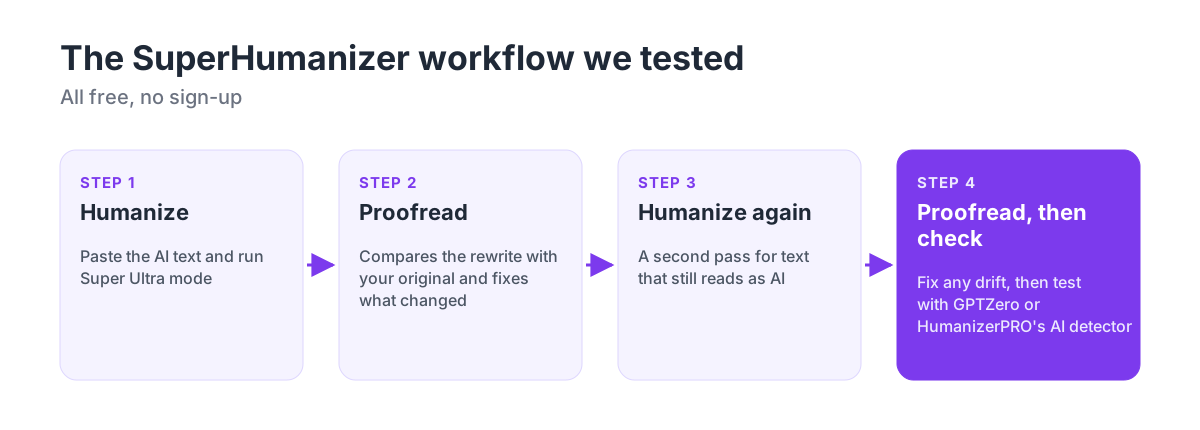
We ran both final texts through GPTZero's Advanced Scan (model 4.1o) and HumanizerPRO's AI detector, then compared each one with the original, sentence by sentence.
Test results: Claude skill vs SuperHumanizer


| Claude Humanizer skill | SuperHumanizer, after Proofread | |
|---|---|---|
| GPTZero Advanced Scan (model 4.1o) | 100% AI | 100% human |
| HumanizerPRO AI detector | 99% AI | 48% AI |
| Words | 168 | 201 |
| Facts kept | All | All |
| Added or changed | Nothing | Two small slips: a leftover "but," and "as one scientist says" |
| Reads like | Clean, neutral editing | A natural magazine-style write-up |
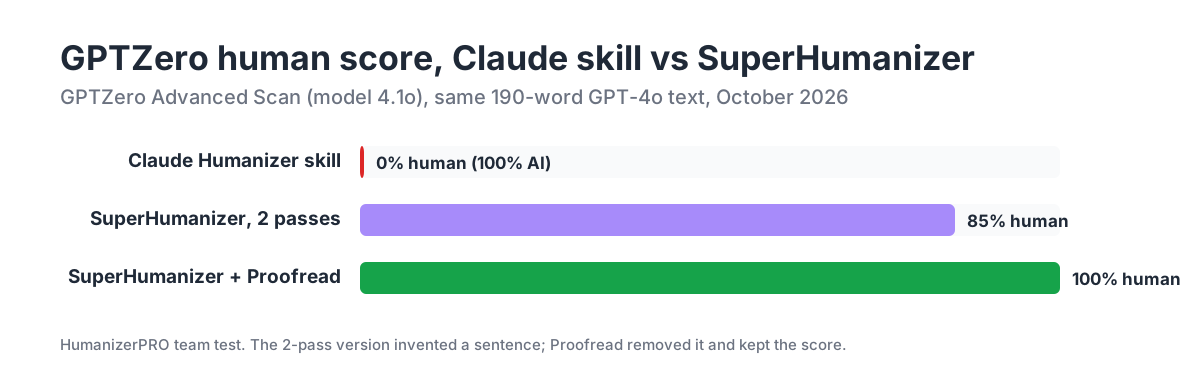
The skill delivered on its promise. It cut "groundbreaking advancement", "the implications of this research are profound" and the dashes, kept every fact, and added nothing. But it preserved the original's order, structure and sentence rhythm, and those are exactly the things AI detectors pick up. GPTZero was "highly confident" the rewrite was AI generated, at 100% AI and 0% human. HumanizerPRO's own AI detector, which is stricter than most, agreed at 99%.
SuperHumanizer did a much heavier rewrite. Two passes in, GPTZero already rated it 85% human, but that version had a problem: the second pass made up a sentence about smart glasses and brain chips and mangled another one. Proofread fixed both, and the final text kept the original's facts, from the protein levels to healthspan, and scored 100% human. HumanizerPRO's detector rated it 48% AI, a sharp drop from 99%. Two small mistakes were left, which you can fix in about ten seconds by hand or with SuperHumanizer's sentence alternatives.
Why the Claude skill doesn't pass AI detectors
The skill is meant for human readers, not for detectors. Its README says it clearly: "Humanizer edits for human readers. Getting past AI detectors is not a goal, and detectors still flag most of its output." The README also says that in a blind test, judges picked the skill's rewrite over the original AI text 16 times out of 16, so it really does make writing easier to read.
It's because of how detectors work. GPTZero, Turnitin and similar tools aren't just searching for words like "delve". They measure how predictable each word is and how evenly the sentences flow, which our guide to perplexity and burstiness explains. When Claude rewrites something, it's still written by a large language model, so it keeps the same smooth, even flow that detectors notice. Removing AI phrases makes the writing more pleasant to read, but it doesn't change the statistics underneath.
A dedicated humanizer works in a different way. SuperHumanizer uses models trained to write more like people, with less predictable word choices and more varied sentences, and then lets you check and fix what comes out.
When to use the Claude skill, and when to use SuperHumanizer
| You want to | Use |
|---|---|
| Clean up your own draft so it sounds less like a chatbot | The Claude Humanizer skill |
| Edit a README, pull request or document inside Claude Code | The Claude Humanizer skill |
| Make AI text read as human to GPTZero, Turnitin or other detectors | SuperHumanizer |
| Rewrite without paying for an AI subscription | SuperHumanizer |
| Fix a single sentence you don't like | SuperHumanizer's sentence alternatives |
| Check that the rewrite kept your meaning | SuperHumanizer's Proofread, or HumanizerPRO's Fix issues |
| Check how a detector will rate your text before you submit it | HumanizerPRO's free AI detector |
For anything where an AI detector decides the outcome, a style editor isn't enough. SuperHumanizer, our sister product, is free with no sign-up, takes up to 1,200 words per run, and works on the web, in Chrome and in its mobile apps. HumanizerPRO (humanizerpro.ai), a free AI humanizer with a built-in AI detector, plagiarism checker and fact checker, is a good place to check the result: paste your text into its free AI detector before you submit it.
Tips if you use both
- Humanize last. If you like the skill's editing, run it on your draft first, then humanize with SuperHumanizer. Running the skill after SuperHumanizer means Claude rewrites the text again, which can undo the humanizing.
- Always proofread. Every humanizer can drift on details. SuperHumanizer's Proofread and HumanizerPRO's Fix issues compare the rewrite with your original and correct what changed.
- Check with the detector that matters to you. Scores differ between GPTZero, Turnitin and others, and they change over time. See our guide to how accurate AI detectors are.
- Follow the rules. If your school or client asks you to disclose AI help, a human score doesn't change that. Our guide to humanizing an AI essay covers how to use these tools honestly.
Need text that reads as human? Try SuperHumanizer, free with no sign-up, then check the result with HumanizerPRO's free AI detector.
FAQ
What is the Claude Humanizer skill?
It's a free, open-source skill for Claude Code, Claude.ai, Codex and other AI tools that shows the AI how to rewrite text without 26 common signs of AI writing. It's based on Wikipedia's "Signs of AI writing" guide and is on GitHub as blader/humanizer, under the MIT license.
Does the Claude Humanizer skill bypass AI detectors?
No. Its own README says getting past AI detectors is not a goal and that detectors still pick up most of its output. In our October 2026 test, GPTZero's Advanced Scan gave the skill's rewrite 100% AI.
Is the Claude Humanizer skill free?
Yes. The skill is free and open source, but you'll need an AI agent that supports skills, like Claude Code, Claude.ai or Codex, and their usage limits still apply.
What's the best alternative to the Claude Humanizer skill?
SuperHumanizer. It's free with no sign-up and allows up to 1,200 words per run. In our test, its rewrite came out 100% human on GPTZero's Advanced Scan after its free Proofread check, where the Claude skill scored 100% AI.
Can Claude humanize text without the skill?
Claude can rewrite text if you ask it to, but that text is still written by an AI model and is likely to keep the patterns detectors look for. The skill helps your style, but if you need to get past detectors, a dedicated humanizer like SuperHumanizer works better.
Does the Humanizer skill work with ChatGPT?
The skill is made for AI agents that support skills, like Claude Code and OpenAI's Codex, and its README has install commands for both. If a chat app doesn't support skills, you can paste the skill's instructions as a prompt, but results vary by model.
How do I check if my text will pass an AI detector?
Check it with the detector you care about, like GPTZero or Turnitin, or use HumanizerPRO's free AI detector for a quick check with no sign-up. Scores vary between detectors, so treat any single result as a guide.

Kamran Khan
Kamran Khan is the founder of HumanizerPRO and a leading voice in the ethical use of AI-generated content. With years of hands-on experience in AI, SEO, and digital publishing, he built HumanizerPRO to help creators and professionals turn robotic AI text into clear, human-like writing that meets real-world standards.