10 Best Free Grammarly Alternatives in 2026 (We Tested Them)
The best free Grammarly alternatives in 2026, tested: free rewriting, AI detection and plagiarism checks, plus grammar checkers that caught 9 of 9 errors.
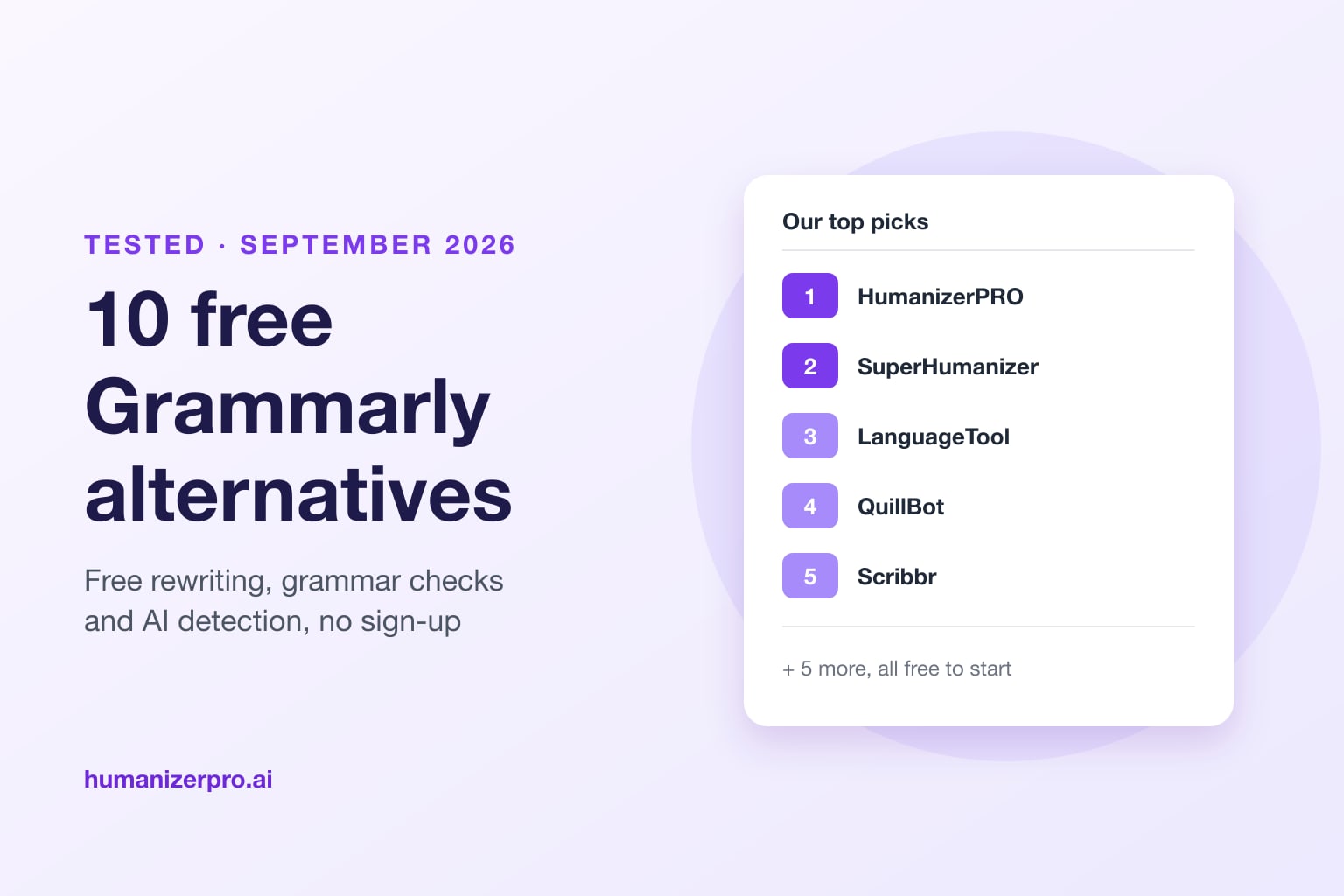
The best free Grammarly alternatives in 2026 are HumanizerPRO, SuperHumanizer, LanguageTool and QuillBot. HumanizerPRO gives you free AI rewriting in nine tones plus a free AI detector and plagiarism checker, which are the features Grammarly keeps behind its Pro plan. SuperHumanizer is a free rewriter with no sign-up and a Chrome extension that works in any text box. For typo-level proofreading, LanguageTool and QuillBot caught all 9 errors in our test for free, with no account. The best free setup combines one rewriter with one grammar checker.
Key takeaways
- Grammarly Free only covers basic corrections and 100 AI prompts a month. Full-sentence rewrites, tone changes, AI detection and plagiarism checks need Pro (from $12 a month, billed yearly).
- HumanizerPRO is the best free alternative to Grammarly's AI features: nine free tone presets, a free AI detector (800 words per scan), a plagiarism checker and a fact checker, with no sign-up.
- SuperHumanizer, our sister tool, is 100% free with no sign-up, rewrites up to 1,200 words per run and has a free Chrome extension plus Android and iOS apps.
- In our September 2026 test, the free versions of LanguageTool, QuillBot, DeepL Write and Grammarly all caught 9 of 9 basic errors. The differences are in limits, rewriting and extras.
- The strongest free setup: rewrite with HumanizerPRO or SuperHumanizer, then proofread with LanguageTool or QuillBot.
The 10 best free Grammarly alternatives at a glance
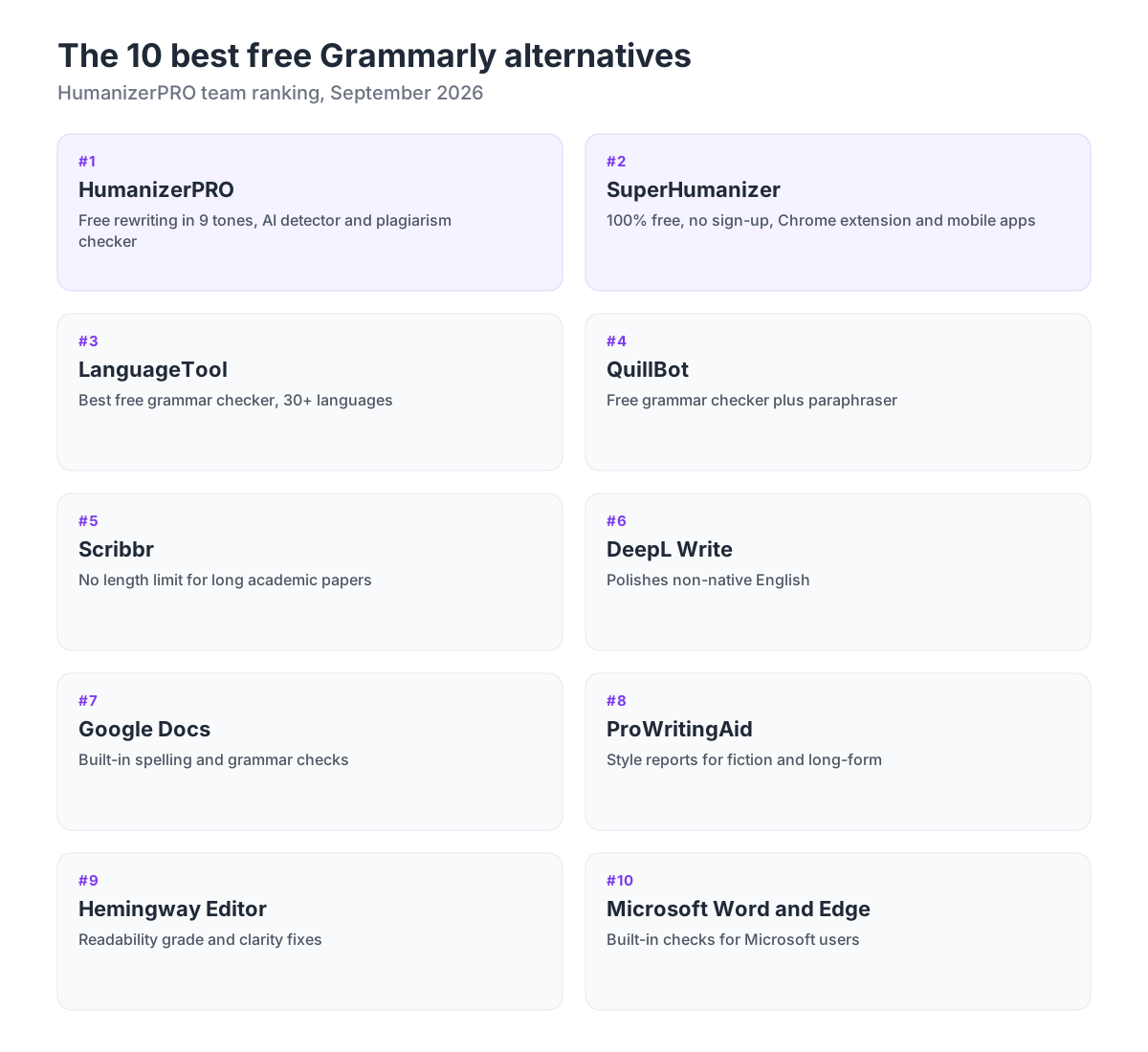
| # | Tool | Best for | Free limit | Sign-up needed |
|---|---|---|---|---|
| 1 | HumanizerPRO | Free rewriting, tone, AI detection and plagiarism checks | 500 words without an account, 1,000 a month with a free account | No |
| 2 | SuperHumanizer | Free rewriting in any text box (Chrome extension) | 1,200 words per run, unlimited runs | No |
| 3 | LanguageTool | Best free grammar checker overall | 2,000 characters per check | No |
| 4 | QuillBot | Grammar checker plus paraphraser | Free grammar check, some suggestions locked | No |
| 5 | Scribbr | Long academic papers | No length limit, English only | No |
| 6 | DeepL Write | Polishing non-native English | 1,500 characters per text | No |
| 7 | Google Docs | Built-in checking while you write | Free in Docs | Google account |
| 8 | ProWritingAid | Fiction and long-form writing | 500 words per report, limited daily runs | Yes |
| 9 | Hemingway Editor | Readability and clarity | Free web editor | No |
| 10 | Microsoft Word and Edge | Built-in checking in Microsoft 365 and Edge | Basic checks free | Microsoft account for Word |
What Grammarly's free plan gives you, and what it locks
Grammarly's free plan checks spelling, punctuation and grammar, shows the tone of your writing and gives you 100 AI prompts a month. That's enough for basic emails and messages, but most of what people want from a writing assistant isn't on this plan.
Grammarly Pro costs $12 a month billed yearly. It adds full-sentence rewrites, tone adjustment, plagiarism and AI detection, and 2,000 AI prompts a month. So when people search for a free Grammarly alternative, they usually want one of two things: a free grammar checker with fewer limits, or the Pro-style rewriting and checking features without paying for them.
That's why this list includes both kinds of tools. The first two rewrite text and cover Grammarly's premium AI features. The rest are grammar and style checkers. No single free tool does everything, but two of them together can cover what most people pay Grammarly for.
How we tested these Grammarly alternatives
In September 2026, the HumanizerPRO team wrote a 67-word paragraph with 9 deliberate mistakes: commonly confused words ("their", "threw", "you're"), a missing apostrophe ("dont"), a wrong apostrophe ("mistake's"), a missing comma after "However" and three subject-verb agreement errors. We pasted it into each tool's free version without signing in and counted the errors it flagged or fixed.
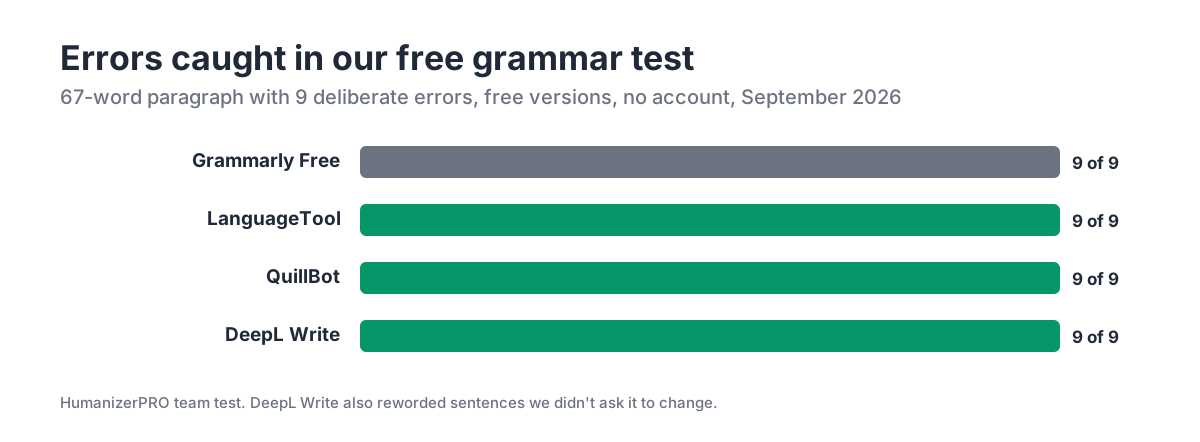
The result surprised us. Grammarly Free, LanguageTool, QuillBot and DeepL Write all caught 9 out of 9. For the everyday mistakes most people make, a free checker is now about as good as Grammarly's free plan. The real differences are how much text you can check at once, whether you need an account, and what other features each tool offers. We also compared each tool's free limits, browser extensions and paid plans on their own websites.
The 10 best free Grammarly alternatives in 2026
1. HumanizerPRO: best free alternative to Grammarly's AI features
HumanizerPRO is an AI writing tool that rewrites text so it reads naturally, in the tone you choose. It covers the features Grammarly charges for: rewriting full sentences, adjusting tone, checking whether text reads as AI-generated, and checking for plagiarism. All of them have a free tier, and you can start without an account.
You can choose from three rewrite modes (Basic, Standard and Advanced) and nine tone presets: General, Academic, Formal, Report, Blog, Business, Marketing, Report Letter and Story. Every mode and tone is free. When we ran unedited GPT-4o text through Advanced mode, GPTZero rated the result 7% AI. Grammarly's free AI humanizer, on the other hand, left the same text at 100% AI.
The same free account gives you three more tools. The free AI detector checks up to 800 words per scan, the plagiarism checker checks up to 300 words per scan, and the fact checker checks claims in up to 500 words. On Grammarly, AI detection and plagiarism checks are Pro-only.
What's good
- Rewrites full sentences and paragraphs in 9 free tones, which Grammarly Free can't do
- Free AI detector, plagiarism checker and fact checker in one place
- No sign-up for your first 500 words; a free account adds 1,000 words a month
- Keeps your meaning, and works in 8 site languages
- Paid plans from $7 a month billed yearly, with up to 3,000 words per input (pricing)
Downsides
- It isn't a real-time grammar checker and has no browser extension of its own, so proofread the final text with a free checker such as LanguageTool
- The free word allowance is small if you write every day
- The PRO Engine, its strongest rewriting model, is paid
Best for: students, bloggers and marketers who want Grammarly Pro-style rewriting, tone control and AI checks for free. If you're not sure how rewriting differs from paraphrasing, read AI humanizers vs. paraphrasing tools.
2. SuperHumanizer: best free rewriter for every text box
Our sister product, SuperHumanizer, is the most generous free option on this list: 100% free, with no sign-up, up to 1,200 words per run and unlimited runs. It offers two modes: Super Lite, which makes quick, light edits, and Super Ultra, which rewrites text more deeply so it sounds natural.
What makes it a true Grammarly alternative is our free SuperHumanizer Chrome extension. Just like Grammarly's extension, it works wherever you already write: Gmail, Google Docs, LinkedIn, social posts, DMs or any other text box on the web. Select a sentence, or hover over it and click the small icon, and the extension rewrites it in place. A single click changes it back if you prefer the original. It needs no account or email and doesn't collect personal data.
It also has free mobile apps for Android and iOS, along with a built-in AI detector. In our humanizer test, it got the best result of any free tool we tried: just 3% AI on GPTZero.
What's good
- Completely free: no sign-up, no card, no monthly word cap
- Chrome extension that rewrites text in any text box, with one-click undo
- Android and iOS apps for writing on your phone
- 1,200 words per run, more than any other free rewriter we tested
Downsides
- It's a rewriter, not a spell checker, so pair it with a grammar checker for typos
- Two modes and no tone presets (use HumanizerPRO for academic or business tone)
- The Chrome extension is new, so it has fewer features than Grammarly's mature extension
Best for: anyone who wants free, unlimited rewriting everywhere they type. See our full SuperHumanizer review.
3. LanguageTool: best free grammar checker overall
LanguageTool is the nearest free equivalent to Grammarly's core grammar checker. It flagged every error in our test text without an account, and it supports more than 30 languages and dialects. It has browser extensions for Chrome, Firefox, Edge, Safari and Opera, add-ons for Google Docs, Word, Gmail and Outlook, and desktop apps for Windows and macOS.
What's good
- Caught 9 of 9 errors free, with no sign-up
- 30+ languages, the best multilingual option here
- Extensions and add-ons for almost every app
Downsides
- The free plan checks only 2,000 characters (about 300 words) at a time
- Only 3 free paraphrases, and style suggestions and "Picky Mode" extras are behind Premium
- It fixes errors but doesn't rewrite or humanize whole paragraphs
4. QuillBot: best free grammar checker with a paraphraser
QuillBot's grammar checker costs nothing, needs no registration and found every error in our test: 9 out of 9. You can go through the corrections one by one or accept them all at once. The checker sits next to QuillBot's paraphraser, AI detector and plagiarism checker, and it also has a Chrome extension.
What's good
- Caught 9 of 9 errors, no account needed
- One-click "Accept all" fixes
- Paraphraser and other writing tools in the same place
Downsides
- "Premium suggestions" such as more formal word choices are locked behind a login and Premium
- The free paraphraser is limited, and Premium costs $8.33 a month billed yearly
- Its AI humanizer now needs an account, and in our QuillBot humanizer test GPTZero still rated its output 100% AI
5. Scribbr: best for long academic papers
Scribbr's grammar checker is free, with no ads, no registration and no length limit, which makes it the simplest free option for checking a whole essay or thesis in one go. It checks grammar, spelling, punctuation and word choice in US, UK and other variants of English.
What's good
- No length limit and no sign-up
- Built for students, with academic writing guides nearby
- Ad-free
Downsides
- English only
- It pushes you toward paid services, such as its AI Proofreader and human proofreading
- No rewriting or tone features in the free checker
6. DeepL Write: best for polishing non-native English
DeepL Write, from the people behind the DeepL translator, corrected all 9 errors in our test. It also reworded the paragraph to read more smoothly, so if English isn't your first language and you want natural flow rather than just error fixes, it's a solid option.
What's good
- Fixed 9 of 9 errors and improved the flow
- Click any word or sentence for alternatives
- Works in Google Docs and Gmail through its Chrome extension
Downsides
- The free version handles only 1,500 characters at a time without an account
- It rewrites more than you asked: it changed "Each of the tools" to "All of the tools" and "limits" to "limitations"
- It chose British English by default in our test, so check the language setting
7. Google Docs: best built-in option
If you already write in Google Docs, you've already got a free grammar checker. Docs flags spelling and grammar issues as you type, and you can step through them all under Tools > Spelling and grammar. There's nothing to install, and it's free with a Google account.
What's good
- Free, built in and always on
- No copy-pasting between apps
Downsides
- Works only inside Google Docs
- Catches fewer style and clarity issues than dedicated checkers
- No plagiarism check or AI detection
8. ProWritingAid: best for fiction and long-form writing
ProWritingAid goes deeper on style than Grammarly, with separate reports on pacing, repetition, sentence length and dialogue. Novelists and long-form writers like it most. It works in Google Docs, Microsoft Office and its own desktop app.
What's good
- Detailed style reports that most free tools don't have
- Useful for books, scripts and long reports
Downsides
- The free plan checks only 500 words per report, with 2 line-editing reports and 10 rephrases a day
- It needs an account
- Premium costs $30 a month, or $10 a month billed yearly
9. Hemingway Editor: best for readability
Hemingway Editor is free to use on the web. It marks long and confusing sentences, passive voice, adverbs and difficult words, and it gives your text a readability grade. It's the fastest way to make your writing shorter and clearer.
What's good
- Free web editor with no sign-up
- Clear color-coded readability feedback
Downsides
- The free editor highlights problems but doesn't fix them; grammar checking and AI fixes are in Hemingway Editor Plus (about $10 a month)
- The desktop app, Hemingway Editor Classic, is a one-time $19.99 purchase
- Not a full grammar checker on its own
10. Microsoft Word and Edge: best if you use Microsoft 365
Microsoft Word has spelling and grammar checking built in as you type, even in the free Word for the web. More advanced writing suggestions need a Microsoft 365 subscription. Microsoft also had a separate Editor extension for Chrome and Edge, but it was retired on October 31, 2025, when Microsoft moved its writing help into the proofing tools built into Edge.
What's good
- Built into Word and Edge, so there's nothing extra to install
- Good enough for everyday documents and emails
Downsides
- The Chrome extension is gone, so Chrome users lose Microsoft's checker outside Word
- Advanced style suggestions need a paid Microsoft 365 plan
- No free AI detection or rewriting in different tones
Note on Ginger Software: You'll see Ginger in other lists of Grammarly alternatives. We chose not to include or recommend it here.
Grammarly Free vs. HumanizerPRO: what you get for $0
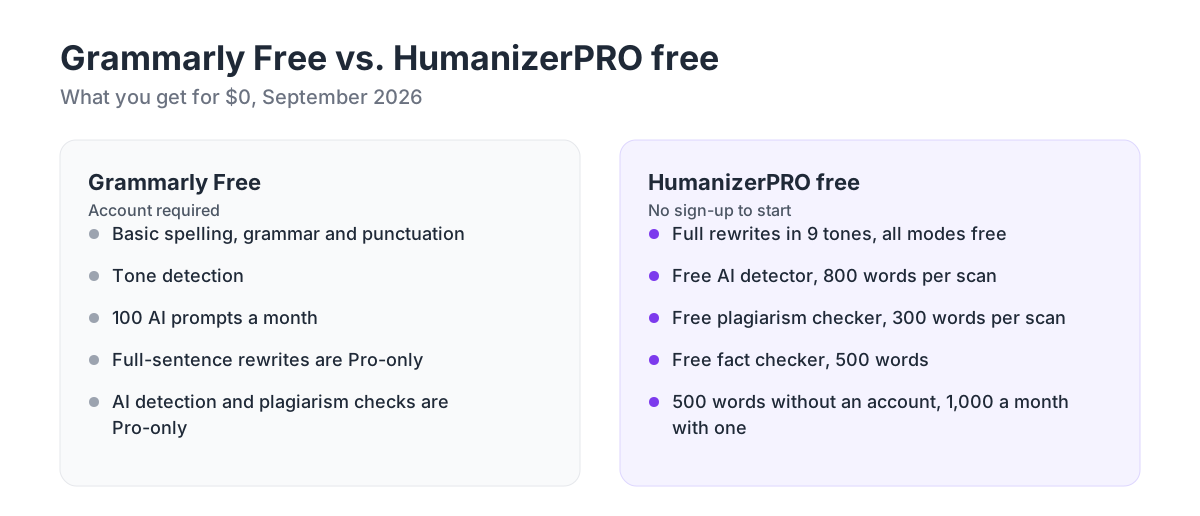
Grammarly Free does a better job of catching typos as you write in any app. HumanizerPRO is better at everything Grammarly puts in its Pro tier: rewriting whole paragraphs, changing tone, and checking for AI detection and plagiarism. That's why it gets our number one spot. People searching for a Grammarly alternative usually already have a spell check built into Google Docs, Word or their browser. What those don't give them is free paragraph rewriting and AI checks.
The best free setup: combine a rewriter and a grammar checker
No free tool replicates all of Grammarly Pro's features, but two free tools together get pretty close. This is the workflow we recommend.
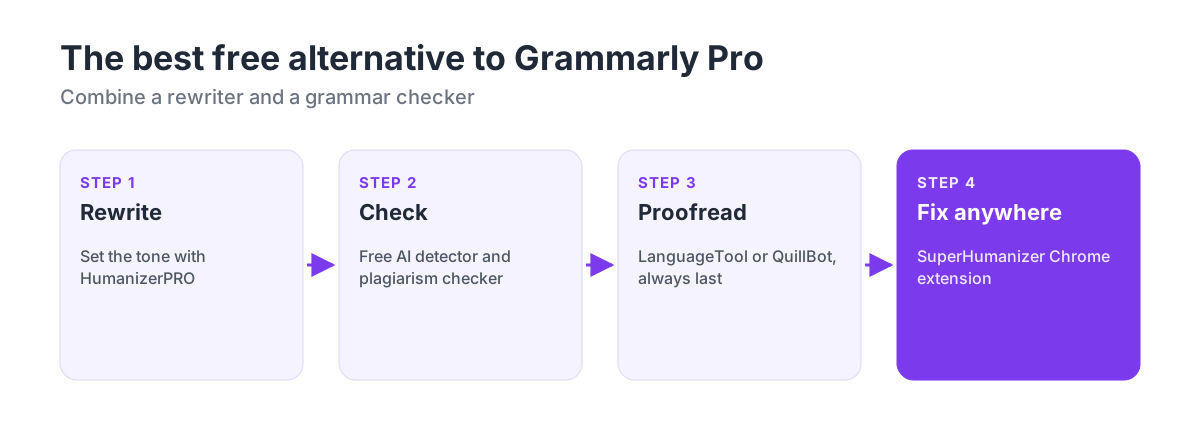
- Rewrite and set the tone. Paste your draft into HumanizerPRO and pick a tone such as Academic, Business or Blog. It rewrites full sentences so the text reads naturally.
- Check it. Run the result through the free AI detector and plagiarism checker. If you're worried about AI flags, read are AI detectors accurate? first.
- Proofread last. Paste the final text into LanguageTool or QuillBot to catch any typos. Always do this step last, because any rewrite can bring in small errors.
- Fix text where you write. For emails, LinkedIn posts and messages, use the SuperHumanizer Chrome extension to rewrite a sentence in place.
If most of your text starts in ChatGPT, our guide on how to humanize AI content from ChatGPT covers the rewriting step in more detail.
Can a free tool replace Grammarly Premium?
For most people, yes, if you use two tools together. In our test, free grammar checkers like LanguageTool and QuillBot caught the same common errors as Grammarly Free. HumanizerPRO and SuperHumanizer cover the rewriting, tone and AI-detection features that account for most of what Grammarly Pro costs.
Grammarly Pro is still worth paying for in one case: if you want real-time suggestions in every app from one tool, with team style guides. Everyone else can get the same results for free by spending a minute more.
Try it free: Rewrite your text with HumanizerPRO. There's no sign-up, and the free AI detector and plagiarism checker are included.
Frequently asked questions
What is the best free alternative to Grammarly?
HumanizerPRO is the best free alternative to Grammarly's premium AI features, with free rewriting in 9 tones, a free AI detector, a plagiarism checker and a fact checker, and no sign-up to start. For typo-level grammar checking, LanguageTool is the best free option: it caught all 9 errors in our test and supports more than 30 languages.
Is there a completely free Grammarly alternative with no sign-up?
Yes. SuperHumanizer is 100% free with no sign-up and rewrites up to 1,200 words per run. HumanizerPRO lets you rewrite 500 words without an account. LanguageTool, QuillBot and Scribbr all check grammar without an account, and Scribbr has no length limit.
Is there a free Grammarly alternative Chrome extension?
Yes. The SuperHumanizer Chrome extension is free, doesn't require an account, and rewrites text in any text field, like those in Gmail, Google Docs and LinkedIn. For grammar checking in Chrome, LanguageTool and QuillBot also have free extensions. Microsoft retired its own Editor extension on October 31, 2025.
Is LanguageTool better than Grammarly?
LanguageTool and Grammarly performed the same on basic errors: both caught all 9 mistakes in our test. LanguageTool supports more languages and dialects (30+), and you can use it without an account, but its free plan is limited to 2,000 characters per check. Grammarly's free plan adds tone detection and 100 AI prompts a month.
Can HumanizerPRO check grammar?
HumanizerPRO rewrites text so it reads naturally in the tone you choose, and it checks text for AI detection, plagiarism and facts. It isn't a real-time grammar checker, so we recommend running the final version through a free checker such as LanguageTool or QuillBot.
What is the best free Grammarly alternative for students?
Students get the most out of HumanizerPRO's Academic tone, free AI detector and plagiarism checker, plus Scribbr's free grammar checker, which works for long essays of any length. If your school uses AI detection, see what to do if you're falsely accused of using AI.
Is Grammarly's AI humanizer free?
Grammarly offers a free AI humanizer, but in our test its output still scored 100% AI on GPTZero. Read our Grammarly AI humanizer review for the full results, or see our list of the best AI humanizers.

Kamran Khan
Kamran Khan is the founder of HumanizerPRO and a leading voice in the ethical use of AI-generated content. With years of hands-on experience in AI, SEO, and digital publishing, he built HumanizerPRO to help creators and professionals turn robotic AI text into clear, human-like writing that meets real-world standards.