AI Humanizer Update: PRO Engine, Alternatives, Purpose
HumanizerPro’s latest update: PRO Engine, Humanization Alternatives, and Purpose-based tone selection for more natural, human-like AI content.
We are proud to release a major update to AI Humanizer, delivering meaningful improvements in how AI-generated writing is transformed into clear, natural, and human-like language. Building on a strong PRO Engine foundation, this update introduces usability and quality enhancements that give users greater control, transparency, and reliability.
This update improves the humanization engine across multiple areas, including output quality, text cleaning, input formatting, and user controls, while maintaining strong performance and a privacy-first experience.
Highlights in This HumanizerPro Update
This update introduces new features and focused improvements, including:
- A more reliable and consistent PRO Engine for higher-quality humanization
- Adjustable Text Cleaning settings to better prepare input text and improve final output
- A local History feature that allows users to revisit previous outputs without signing in or creating an account
- Performance and stability improvements across all humanization modes
sbb-itb-1768945
New PRO Engine: Smarter Humanization System
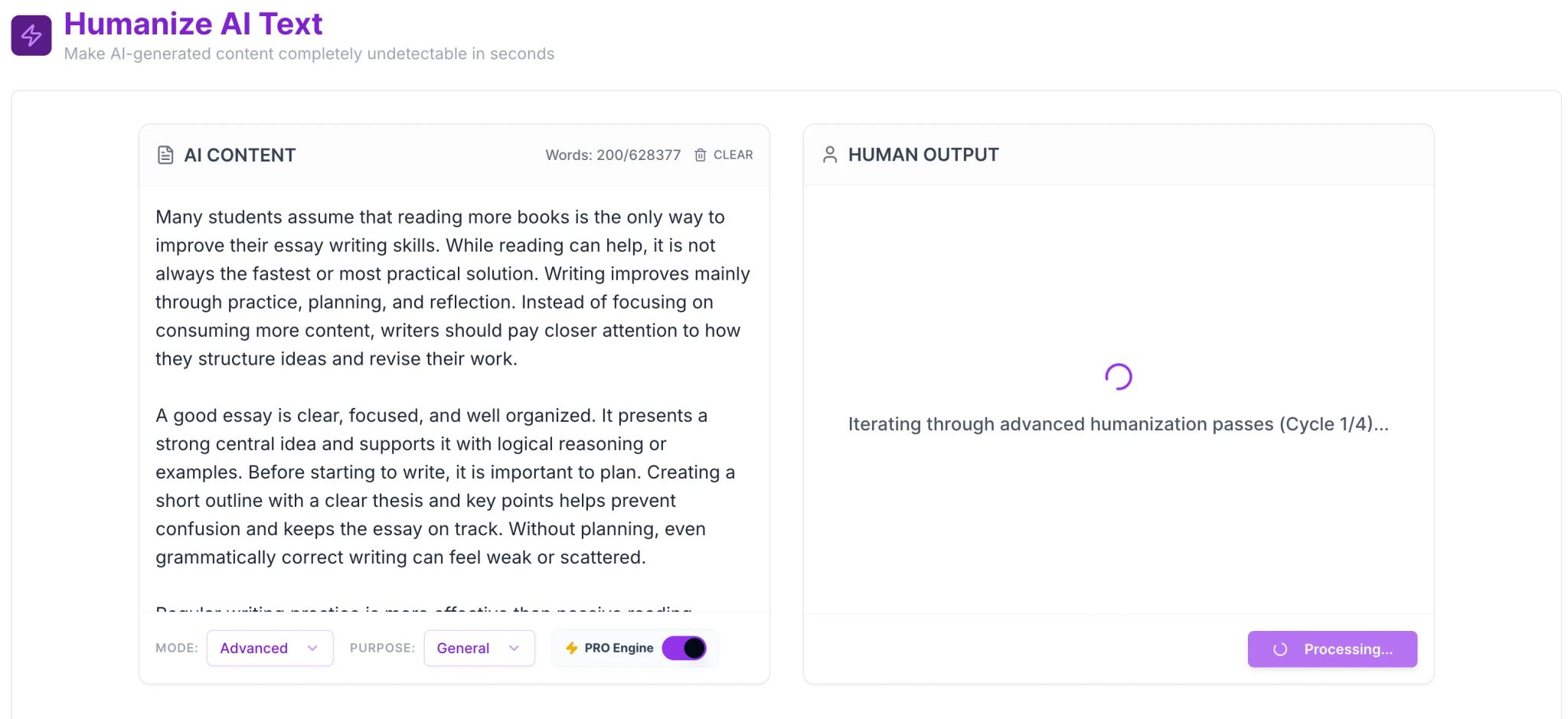
The PRO Engine is now available to all users and represents a major improvement over previous versions.
Instead of relying on a single model or one rewrite pass, the PRO Engine intelligently uses all available models together. It generates multiple variations of your content, tests them against large datasets of real human writing, and selects the most natural-sounding result.
This update improves sentence flow, word choice, and overall structure, producing content that reads like it was written by a real person.
The PRO Engine is also designed to perform strongly against popular AI detection tools such as GPTZero, ZeroGPT, and Originality AI, while maintaining clarity and meaning.
Humanization Alternatives
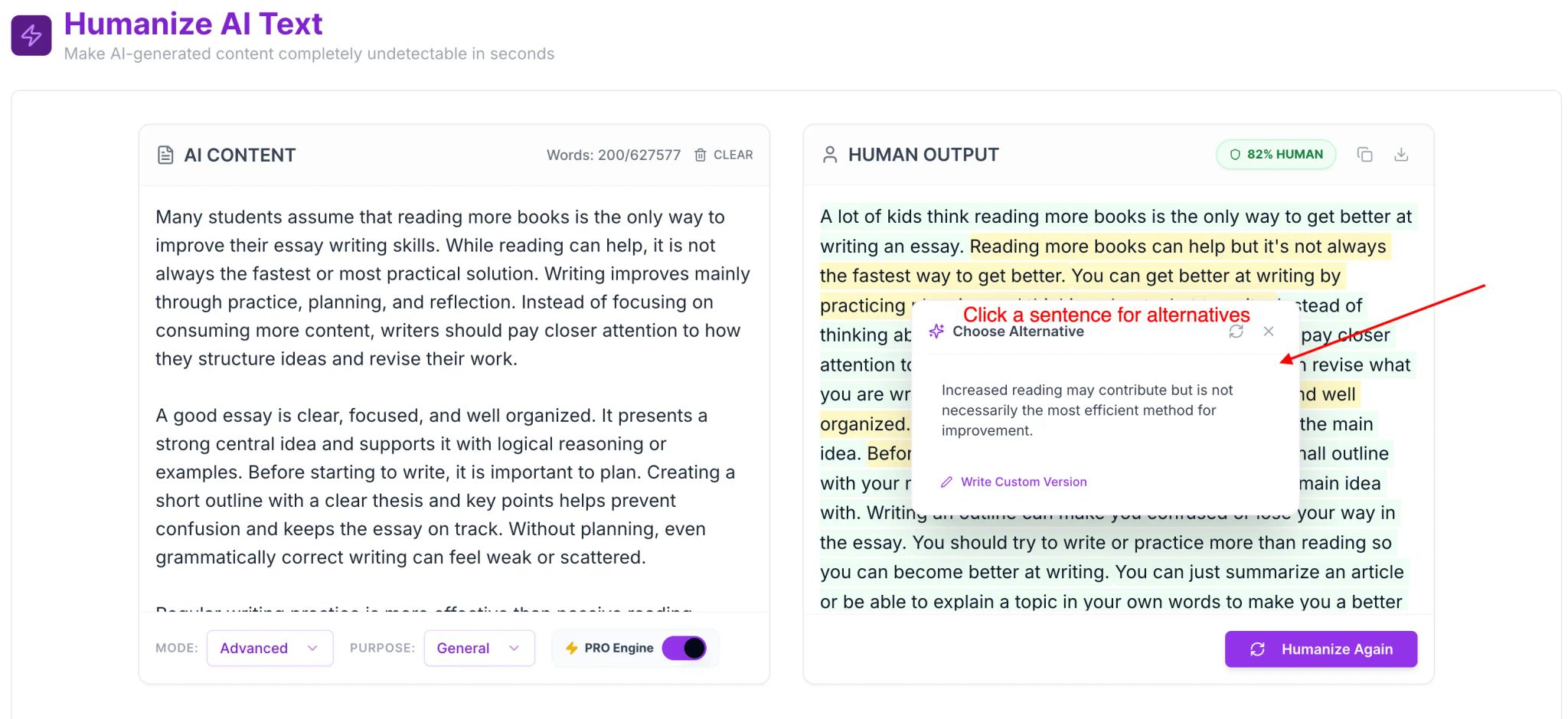
Another important addition in this update is Humanization Alternatives.
This feature allows you to select any sentence in your humanized text and instantly generate multiple alternative versions. Each alternative keeps the original meaning but offers different phrasing and flow.
This update gives users more control over the final output, making it easier to adjust tone, improve readability, or refine professional and academic content.
Humanization Alternatives are especially useful for users who want precise control over how their content sounds.
Purpose-Based Tone Selection
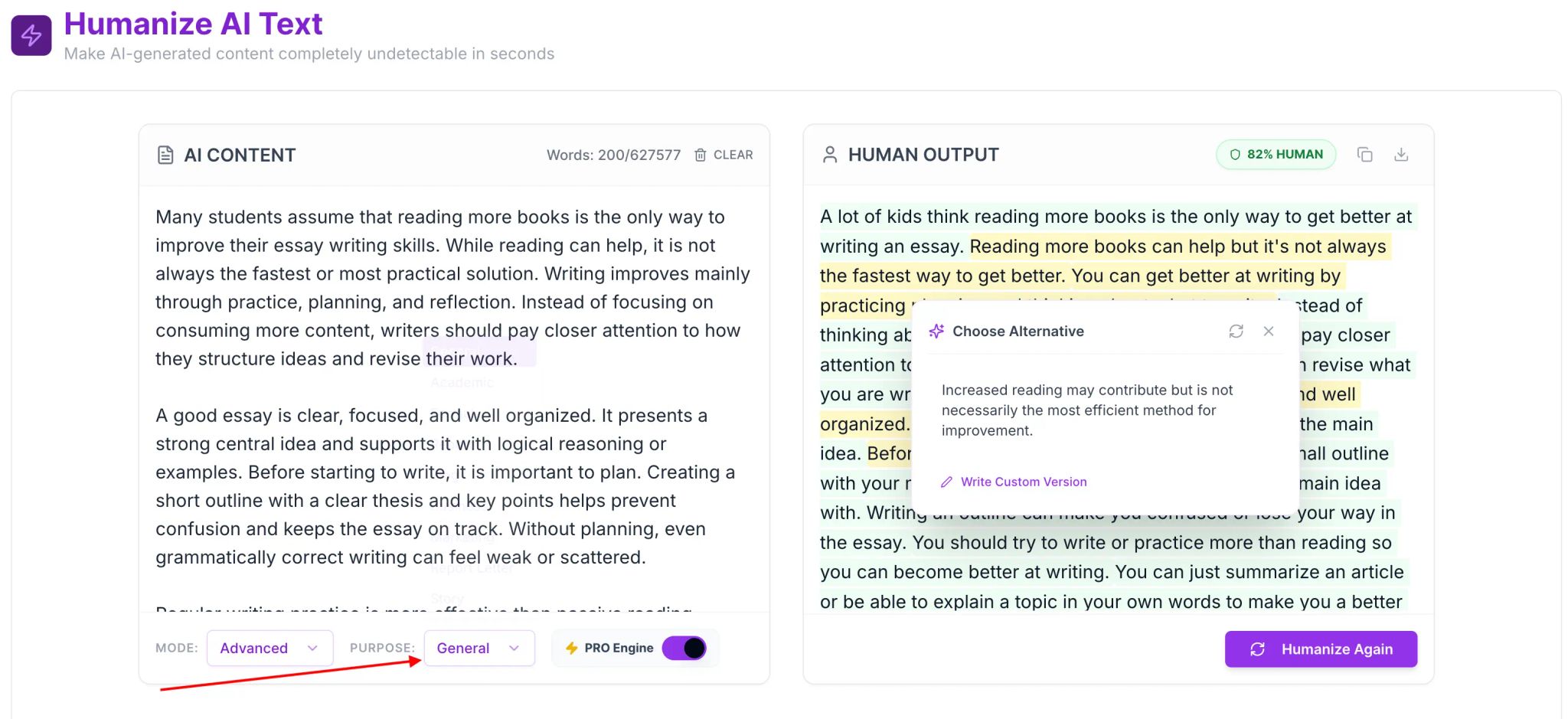
This update also introduces Purpose selection, allowing users to choose the tone and writing style before humanization begins.
Purpose selection helps the PRO Engine understand how the content should sound, depending on where and how it will be used.
Available Purpose Options
Each option is designed to match real-world human writing styles.
Natural
Balanced and neutral tone suitable for general use.
Academic
Scholarly, objective, and well-structured writing with precise vocabulary. Best for essays and research content.
Formal
Professional, respectful, and clearly structured. Ideal for official and professional communication.
Report
Data-focused, objective, and concise writing for reports and analytical content.
Blog
Engaging, easy to scan, and SEO-friendly with a conversational touch.
Business
Professional, actionable, and concise. Suitable for business documents and proposals.
Marketing
Persuasive, benefits-focused, and engaging for promotional content.
Report Letter
Formally structured writing with a clear purpose and professional tone.
Story
Narrative, descriptive, and engaging with smooth flow.
How to Use the New Features
This update is designed to be simple and intuitive.
- Paste your AI-generated content into HumanizerPro.
- Select the PRO Engine for advanced humanization.
- Choose a Purpose that matches your content type.
- Generate the humanized output.
- Use Humanization Alternatives to refine individual sentences if needed.
Why This Update Matters
This HumanizerPro update improves how content sounds, not just how it looks.
By combining advanced model selection, sentence-level alternatives, and purpose-based tone control, HumanizerPro now produces writing that feels more natural, more intentional, and more human.
This update reflects our ongoing focus on improving quality, realism, and user control.
New Functionality: Text Cleaning Controls
Released on: 17/01/2026
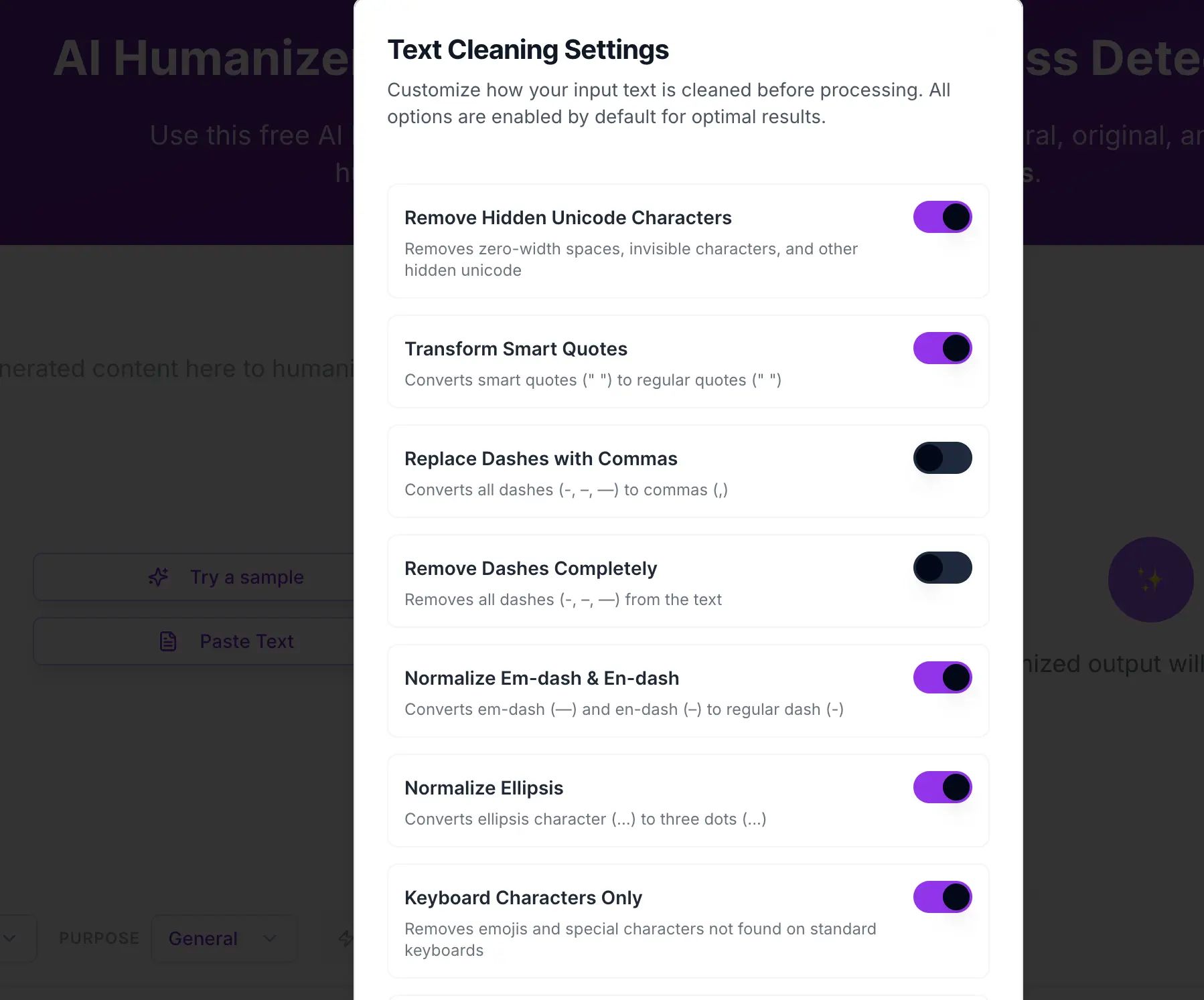
Text cleaning is an important part of high-quality humanizing output. This function lets you control the cleaning of your text before humanizing.
All options are on by default to get the best results, and you can fully adjust what will be cleaned in the options according to your preference.
Text Cleaning Options Available
- Normalize text to remove hidden characters such as newlines or zero (0) Unicode characters.
- Convert smart quotes into standard quotes.
- Convert an en dash or em dash into a dash, or customize what will be replaced.
- Convert ellipses into three dots, or customize what will be replaced.
- Remove emojis and non-standard keyboard characters.
- Optionally replace dashes or remove dashes entirely.
These options remove invisible characters, formatting noise, and inconsistencies present in raw input that lower output quality or trigger AI detectors. This helps keep the text natural and humanizing, as AI-generated content can sometimes produce lower-quality output.
Suggested Uses for the Text Cleaning Options
Removing these elements helps us more authentically rewrite the text by:
- Eliminating unnatural text patterns in AI output.
- Making punctuation and sentence flow more natural.
- Removing formatting artifacts copied from other programs.
- Creating more realistic text that sounds rewritten with less effort.
New feature: History (no signup needed)
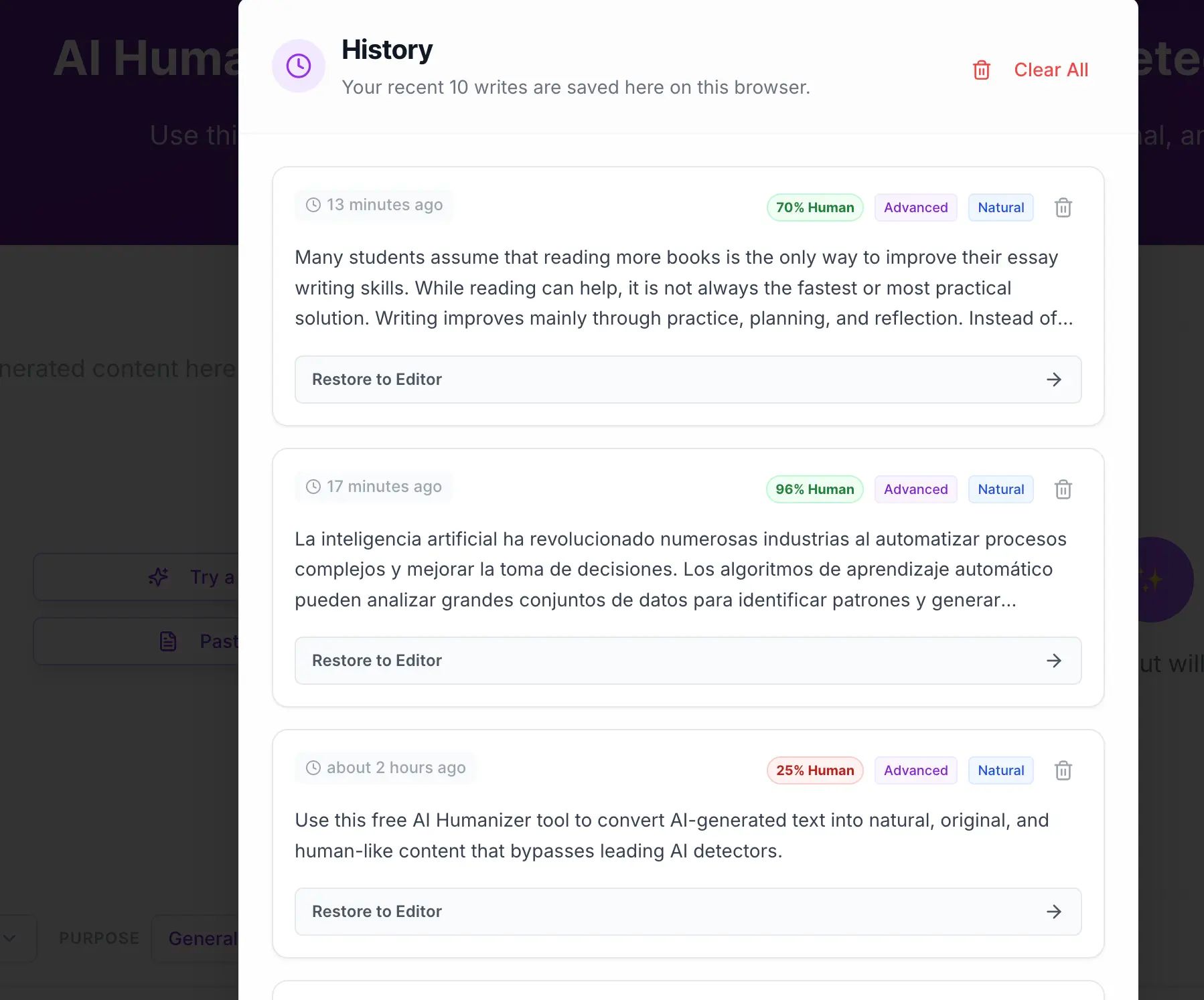
Released on January 16, 2026, the new History feature gives you immediate access to your last humanized output.
How it works
- The last 10 writes are kept only in your browser
- No signups, logins, or profiles required
- Your data is held only on your device
You can quickly bring previous output back to the editor without any delay or signup steps. We keep things fast, in the user's control, and respect privacy by not uploading writing data to the server.
Browser cache storage limits access to your history. However, this is lost if you clear your browser cache.
What Can I Do
- Keep editing enabled unless you have a specific reason not to.
- Paste raw AI output for the best conversion results.
- Carefully examine restored history before publishing or proofreading.
- Use Natural or Advanced mode depending on the length of your text.
What Should I Avoid Doing
- Never use special characters or keystrokes to trick AI detectors.
- Do not over-edit content before rewriting.
- Do not assume history will automatically sync across browsers.
- Do not disable options without understanding the consequences.
Bug Fixes and Speed Improvements
Batch rollout between 14/01/2026 and 18/01/2026:
- Fixed several bugs causing out-of-control repetition and improved engine speed.
- Optimized performance of the advanced humanization mode for long passages.
- Renamed some options to improve clarity and resolved a bug handling exotic characters during text cleaning, which sometimes occurs when copying text from other documents or Excel.
Summary
More transparent, more configurable, and more private. You can now humanize and clean your text more efficiently and trust that it will create a better rewriting process.
More updates are on the way!

Kamran Khan
Kamran Khan is the founder of Humanizer Pro and a leading voice in the ethical use of AI-generated content. With years of hands-on experience in AI, SEO, and digital publishing, he built HumanizerPro to help creators and professionals turn robotic AI text into clear, human-like writing that meets real-world standards.